Sep 8, 2020 3:03 PM UTC
Solved

Limits Dimension (Side by side vs Above/Below)

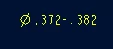
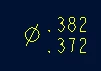
What config in the drawing config file controls whether a "Limits" dimension is Lower-Higher (side by side) vs Higher/Lower (above and below)?
 

Dale_Rosema_0-1599577245096.png


Dale_Rosema_1-1599577267602.png


Sep 8, 2020 8:00 PM UTC

ProWorkAround:


Making sure that the default_tolerance_display_style: std_asme


A new dimension was created and now its hyphenated.

Then delete  erase old dimension (in case the stacked version is used in another instance and will disappear from those instances).

12 replies

Sep 8, 2020 3:25 PM UTC

Looks like this:

TomU_0-1599578717709.png


Sep 8, 2020 3:27 PM UTC

Oddly enough, it doesn't seem to be doing anything in my test drawing.  Hmmm.  (Creo Parametric 6.0.5.0)

Sep 8, 2020 7:49 PM UTC

Both drawings had default_tolerance_display_style: std_asme

Sep 8, 2020 3:36 PM UTC
Sep 8, 2020 4:40 PM UTC

Server reboot causing other issues. I'll have to get back to this later.

Sep 8, 2020 3:55 PM UTC

Hi, 


It looks like this option might be the one you want to mess around with. I did a quick test and it looks like the orientation of the dimension matters. This seems a little odd and definitely inconvenient. There's also separate settings for the other types of dimensions.


Tdaugherty_0-1599580056532.png


Ty


Sep 8, 2020 7:32 PM UTC

TDaugherty, What are you opening to get that pop-up window?

Sep 8, 2020 7:36 PM UTC

In drawing mode:

File > Prepare > Drawing Properties > Detail Options


This menu is where you can create and export dtl files.

Dale_RosemaAuthorAnswer
Sep 8, 2020 8:00 PM UTC

ProWorkAround:


Making sure that the default_tolerance_display_style: std_asme


A new dimension was created and now its hyphenated.

Then delete  erase old dimension (in case the stacked version is used in another instance and will disappear from those instances).
