
Dec 14, 2018 2:10 PM UTC
Solved

Is there a way to see which revision iteration/versions of the components are in an assembly?

When I open my assembly, at the top it tells me the revision and iteration of the assembly (ex: A.4).  Is there a way to see what the revision and iteration of the components in that assembly without opening the components individually??  I realize that by default, the most current version of each component is pulled from Windchill.  I would like the be able to see it though. 


Using Creo 2.0, Windchill 10.2


TomUAnswer
Dec 14, 2018 2:24 PM UTC

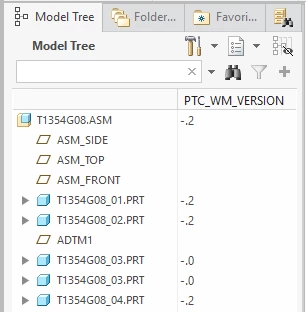
Under tree columns, choose 'Database Params' for from the dropdown and then choose 'PTC_WM_VERSION'.


PTC_WM_VERSION.PNG

4 replies

Dec 14, 2018 2:20 PM UTC

You should be able to add the Windchill parameters for those values to your tree columns in Creo.

TomUAnswer
Dec 14, 2018 2:24 PM UTC

Under tree columns, choose 'Database Params' for from the dropdown and then choose 'PTC_WM_VERSION'.


PTC_WM_VERSION.PNG

BriGuyAuthor
Dec 14, 2018 2:39 PM UTC

You know I've been using Creo for over 10 years and I never noticed the drop down for Type.  Thanks!!

Dec 14, 2018 4:09 PM UTC

Remember, the database parameters are only there if you are using Windchill. If you use Creo without Windchill, then you have to manually control the revision with a drawing/model parameter.