
Apr 12, 2019 10:40 PM UTC
Solved

Is there a way to purge part faces of color?

Greetings,

Creo 5 user here. As you may have experienced, when you import a STEP file, sometimes the original designer exported it such that the material or colors caused the exported file to contain colors on the surfaces of the part.


Is there a quick shortcut to make the entire part or assembly go to Creo's default gray without going through the material editor and editing the colors?


I'm importing more and more black-colored parts and it's difficult to discern geometry.
TomUAnswer
Apr 12, 2019 11:32 PM UTC

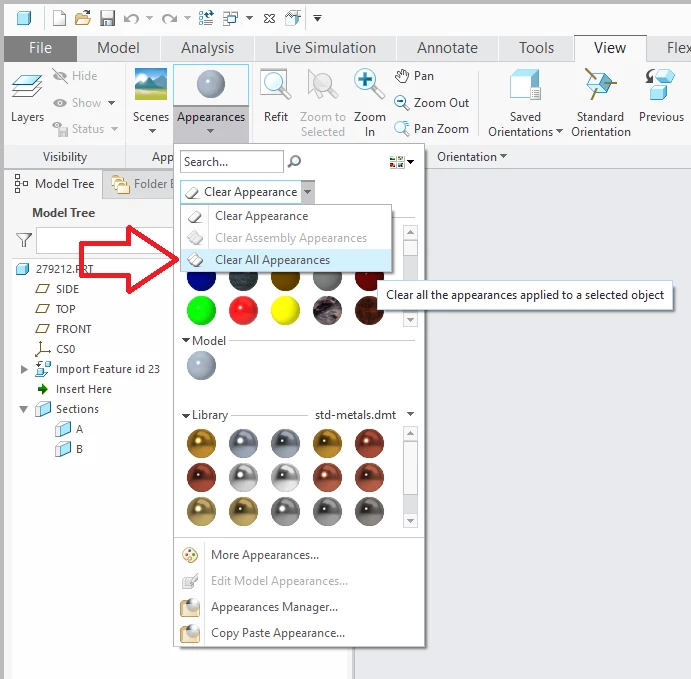
View --> Appearances --> Clear All Appearances


Clear Appearances.png

3 replies

TomUAnswer
Apr 12, 2019 11:32 PM UTC

View --> Appearances --> Clear All Appearances


Clear Appearances.png

michaeljhAuthor
Apr 12, 2019 11:36 PM UTC

You are a gentleman and a scholar. Much appreciated.

Apr 13, 2019 7:35 AM UTC

It's indeed a good interactive solution. you might even want to create a mapkey.


Did you try importing the model with a template? This template would have no appearance. Hence when importing the step file the template none appearance would be applied to the model.