Apr 12, 2017 11:48 AM UTC
Solved

import a pdf into the sketch mode

Does someone knows is it possible? In case, how...?

Thanks!!!

Apr 12, 2017 3:24 PM UTC

Hi,

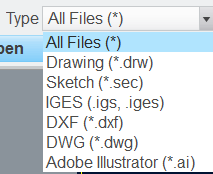
I think it is not possible. Following file types are allowed.

MH

8 replies

Apr 12, 2017 3:24 PM UTC

Hi,

I think it is not possible. Following file types are allowed.

MH

Apr 12, 2017 4:38 PM UTC

Try this.   Change the extension of the pdf to ai.   It works in reverse.  If you ever have an .ai file you can change it to pdf and open and view it.

Apr 12, 2017 4:45 PM UTC

Unfortunately extension change does not seem to work in Creo Sketcher.  I have not had a chance to try it with a true AI file but I will and let you know.

Apr 12, 2017 5:02 PM UTC

Does not seem to work with a native AI file either.  Has anyone ever had any luck bringing in AI files to sketcher?   My only success has been to bring a PDF or AI into Inkscape (a free vector drawing 2D program) then send it out as a DXF to import into Creo. 

bmagnaniAuthor
Apr 13, 2017 9:01 AM UTC

I am trying to import a pdf like an image in order to sketch over it. I know that it is possible to convert a pdf into an image or even in a AI file, but as an image (jpg,...)  the dimensions seems quite different; converting in a AI file I found too many segment and it's very difficult to manage.

Thanks a lot, anyway.

Apr 13, 2017 9:29 AM UTC

Hi,

click View > Model Display > Images (in Creo 2.0). Then you can place image onto datum plane. In next step you can create sketch seeing the image.

MH

bmagnaniAuthor
Apr 13, 2017 9:45 AM UTC

Thanks, I know this procedure, but as you can see it is not possible to import directly a pdf.I have to convert it in an image but the dimensions are different.

The only way I see is to convert the pdf into an image and then to fit the image in the same dimensions.

B.

Apr 13, 2017 4:53 PM UTC

If your pdf is a vectorial file, not raster, you can convert it into a dxf or dwg, then you can import it. There are a lot of free programs that do that.