
Feb 21, 2022 9:03 AM UTC
Solved

Icons or Dimensions missing, white boxes

I'm wondering if anyone else has noticed this strange behavior of constraint icons or dimensions being lost ?

So far this is what I've found:

  • happens in creo 7.0.6 and 8.0.2
  • on an Nvidia machine Quadro P2000 and on a virtual AVD AMD machine
  • comes out of the blue
  • can be missing in one part and still visible in another.
  • restarting creo will often solve it.
  • Updating to the latest driver won't help
  • often on files originating from Creo 4
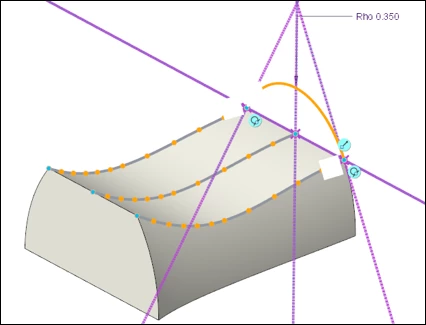
 

constraint-icon-white-blocks_creo803.png

I'm not expecting advise or anything to solve it, just trying to collect more clues.

Feb 22, 2022 10:15 AM UTC

Hi,

maybe Creo data saved in PTC_WF_ROOT directory are problematic. Rename this directory temporarily, Creo creates new directory structure containing default data.

4 replies

Feb 22, 2022 8:25 AM UTC

Hi,

maybe the problem is related to configuration options mentioned in https://support.ptc.com/help/creo/creo_pma/r6.0/usascii/index.html#page/whats_new_pma/fund-enhanced_visibility_dim_graphics_window.html document. It looks like white dimension value is displayed on white background. You can try to activate predefined dark color scheme.

Kristof_DAuthor
Feb 22, 2022 10:07 AM UTC

Hi Martin,
Thanks for thinking along.
It's not related to those settings, as I have another example from a colleague working with the dark scheme.
The white blocks in this example actually should represent such a blue circle with the coincident icon (as you see above and beside it other examples). 

Feb 22, 2022 10:15 AM UTC

Hi,

maybe Creo data saved in PTC_WF_ROOT directory are problematic. Rename this directory temporarily, Creo creates new directory structure containing default data.