
Feb 20, 2024 3:12 PM UTC
Solved

I don't have the option of dimension properties Creo 7.0.10.0
KP_10918554_1-1708441432406.png

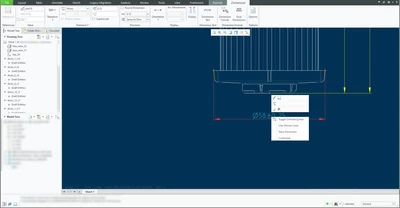
Hello, I would like you to help me with the following question, I have already reviewed the blog and the PTC community, however I cannot find a solution. I am trying to convert this dimension into an inspection dimension. Likewise, I have to use the properties of this dimension, I right clicked and this appears, only this option, (see picture)  I'm using 7.10.0.


I have seen on another blog that it is necessary to unlock it but I do not have that option, if someone can help me it would be of great. It toke a lot of my time.
 

StephenWAnswer
Feb 20, 2024 3:23 PM UTC

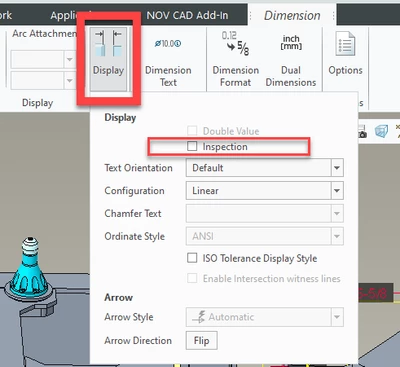
Everything in the dimension properties is now in the ribbon. Like @KenFarley mentioned.

Its not obvious the DISPLAY icon will expand.


StephenW_0-1708442553936.png


4 replies

Feb 20, 2024 3:17 PM UTC

Uncertain if you tried this already, but to make a dimension an "inspection" dimension, you use the "Display" function in the ribbon. There's a check box in the menu dialog that comes up that says "Inspection".

Feb 20, 2024 3:20 PM UTC

Thank you for your replay, Yes, I already have the measurement inspection measure, however I still need the dimension properties.

Feb 20, 2024 3:25 PM UTC

I don't understand what you are looking for. Making the dimension an "inspection" dimension  just puts a "racetrack" box around whatever you have defined as the dimension. You set up the way it looks with all the ribbon options, and the box surrounds it all.

StephenWAnswer
Feb 20, 2024 3:23 PM UTC

Everything in the dimension properties is now in the ribbon. Like @KenFarley mentioned.

Its not obvious the DISPLAY icon will expand.


StephenW_0-1708442553936.png