
May 4, 2020 8:52 PM UTC
Solved

How to project a datum point onto a non planar surface?

Hello to all, 

how can I project a datum point onto a non planar surface? I tried to use datum point command but only allows project onto plane or planar surface.

If it is not possible, it there any workaround to accomplish it?

BTW, I´m using Creo 4.0.

Thanks.
StephenWAnswer
May 5, 2020 6:49 PM UTC

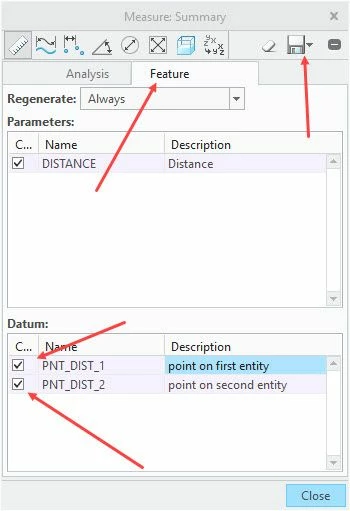
A different normal can be for each and every point on the surface. You may be able to get what you want by going to Analysis tab, measure, select the point and the surface, in the analysis dialog, box, select feature, then checkbox the datum points for both positions, and SAVE in the analysis box, you can accept the default name.

project.jpg

11 replies

May 4, 2020 9:13 PM UTC

You can add an axis or sketch line that intersects the surface. The you can create the point at the intersection.

rcaetanoAuthor
May 5, 2020 9:50 AM UTC

It is not clear for me what you said. For instance I would like to project datum point highlighted on picture below onto surface. How can I do this?

May 5, 2020 10:11 AM UTC
Create an Axis thru the point that that intersects the surface. Then create another point at using the point command, select both the axis and the surface.