Mar 8, 2022 3:33 PM UTC
Solved

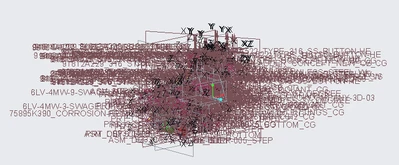
How to prevent the enthusiastic showoff of datums and annotations when starting a CREO session?
JS_9824412_0-1646753307440.png

See the screenshot above, the datums and annotations always show up when I open a CREO session. Is there a simple setup to avoid this? Thanks.

tbraxtonAnswer
Mar 8, 2022 3:52 PM UTC

The dreaded datum forest...


One option (preferred):

Use layers to organize datums in your models and save the models with the layers hidden. Remember to save the layers status when doing this.

If you do not have layers already you can create a layer definition file and read it into the existing parts to create the layers and include the datums to the layers using rules.


Another option:

Turn off datum display filters to remove the datums from display.

9 replies

tbraxtonAnswer
Mar 8, 2022 3:52 PM UTC

The dreaded datum forest...


One option (preferred):

Use layers to organize datums in your models and save the models with the layers hidden. Remember to save the layers status when doing this.

If you do not have layers already you can create a layer definition file and read it into the existing parts to create the layers and include the datums to the layers using rules.


Another option:

Turn off datum display filters to remove the datums from display.

Mar 8, 2022 4:16 PM UTC

Add these to your config.pro


display_axes NO
display_coord_sys no
display_planes NO
display_points no

Mar 8, 2022 4:43 PM UTC

I developed a mapkey "zxcv" that toggles between the datums & axis on and off.

You get the "forrest" when on but you can easily turn them off.

Mar 8, 2022 4:49 PM UTC

The toggle option is quite useful for this. I also use a toggle mapkey for all datum feature display that is mapped to a button on an input device. Essential timesaver when working with data packages we inherit with this particular issue.