
Jul 16, 2015 7:25 PM UTC
Solved

how to place a GTOL on a hole note

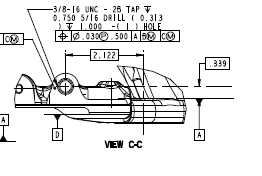
I make a hole and create Geometric Tolerance in model, such as 3/8-16 UNC -2B TAP THRU 5/16 DRILL (0.257) .0750 - (1) HOLE. I only can put GTOL as a free note in drawing as shown below

Is there a method to place to a hole note directly?

Thanks,
GTOL01.png

JLGAnswer
Jul 17, 2015 1:23 PM UTC

I'm attaching a ppt on how I like to do it -- you add the gtol as a free note but then go back and include it in the thread note.  It's clumsy but it gets the job done.

4 replies

Jul 17, 2015 12:51 PM UTC

It looks like you created a note without any &dimension or &ad dimensions. Add a shown dimension or created dimension to your note. Then you can attach the GTOL to that dimension. I suggest adding one of the depth dim's to your note. Could look like: depth &dxxx or &adxxx. Also make sure your Detail Config has "gtol_dim_placement" set to "on_bottom" which is default.

JLGAnswer
Jul 17, 2015 1:23 PM UTC

I'm attaching a ppt on how I like to do it -- you add the gtol as a free note but then go back and include it in the thread note.  It's clumsy but it gets the job done.

jzhang-3Author
Jul 17, 2015 2:10 PM UTC

It is a great and best way!!!!

Thank you very much!