
Dec 3, 2013 4:33 PM UTC
Solved

How to insert text into detail drawing

Very new to Creo, can anyone tell me how to insert text into detail drawing? For example I would like to add quantities next to balloons, not split the balloons with quantities. How do I add a general note as well, I just dont see an interface to add text to a drawing? Thank you
Dec 3, 2013 4:44 PM UTC

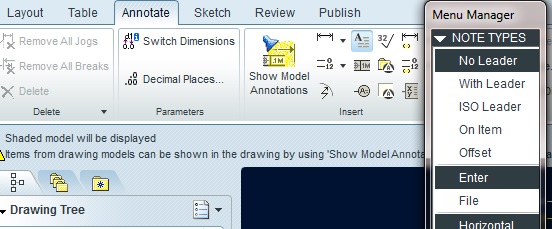
As for adding text, go to the annotate tab and then to the menu manager for whether you want a leader or not....

adding_text.jpg

As for associating the text with balloon, weld notes or the such, here is a product suggestion to vote on:

http://communities.ptc.com/ideas/2186

Thanks, Dale

4 replies

Dec 3, 2013 4:44 PM UTC

As for adding text, go to the annotate tab and then to the menu manager for whether you want a leader or not....

adding_text.jpg

As for associating the text with balloon, weld notes or the such, here is a product suggestion to vote on:

http://communities.ptc.com/ideas/2186

Thanks, Dale

Dec 3, 2013 4:46 PM UTC

You can RMB and chose Relate to View, so that if you move the view around it will move with the view, but if you move the balloon independantly of the view, you will also have to reposition the text.

Thanks, Dale