Jun 20, 2018 5:36 AM UTC
Question

HOW TO HIDE THE REGENERATION STATUS BOX?

Hello Expert's


Is there any config options to hide the regeneration status box. which appears if model regeneration failed.

Please see the image give below.
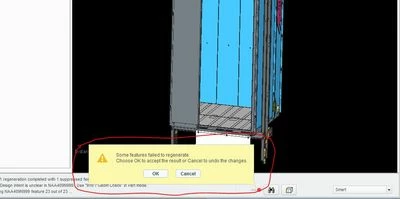
error.JPG


With Regards

Aghil.M

8 replies

Jun 20, 2018 11:40 AM UTC

So...when dealing with "cause and effect", you want to focus on the effect?


If I were you, I would spend some more time and fix the cause...


In other words, you should fix the errors in your design, not hide the regeneration status box which shows that you have a problem with your design.

3-Newcomer
Jun 20, 2018 12:14 PM UTC

I understand your point, however there are many times where I make a change that I know will cause failures and being able to bypass this dialog would be helpful in those cases.  However, in most cases, the user needs to know that they've broken something and it needs to be fixed.

 
Jun 20, 2018 1:27 PM UTC

@dgschaefer wrote:

...there are many times where I make a change that I know will cause failures...


Don't get me started Smiley LOL Smiley LOL Smiley LOL

Jun 20, 2018 1:53 PM UTC

Maybe what PTC needs to implement is a button in that box that will hide it for the rest of that session of Creo. You get the warning once, so you know there is an error, but after that you turn it off as you continue your build. There should also be a button in the options menu to turn the error message box back on within your session.

I agree with Hamster, fix the cause not the effect, but Doug's point about doing something that causes an error on purpose does have some merit. However, creating an error on purpose is the exception, not the rule that triggers the warning box.
