
Jun 1, 2020 2:37 PM UTC
Solved

How to Erase Drawing Names from Memory

Community,


I would like to be able to erase the drawing names from memory in the pull-down under Name.  Selecting the "-" will not erase the names from memory.  Can this be accompolished?  I am using Creo 6.0.0.0, and thanks in advance.
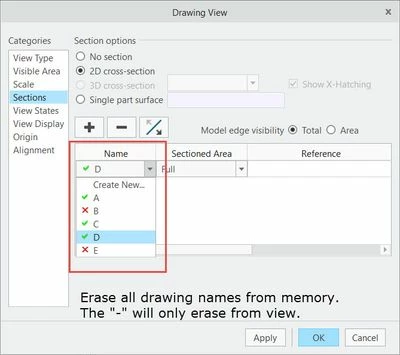
 

drawing view names.jpg


StephenWAnswer
Jun 1, 2020 2:41 PM UTC

The screenshot is showing sections that are created in the model. You can go to the model and delete the section.

If you want the view to not use a section, select the "no section" option instead of the "2D cross-section" option

4 replies

StephenWAnswer
Jun 1, 2020 2:41 PM UTC

The screenshot is showing sections that are created in the model. You can go to the model and delete the section.

If you want the view to not use a section, select the "no section" option instead of the "2D cross-section" option

ThoRigAuthor
Jun 1, 2020 3:08 PM UTC

That is correct.  When I created a 2-D cross-section from the drawing, it made a drawing section in the model tree.  Thanks.