
Aug 31, 2016 7:29 AM UTC
Question

How to create tapered corner in model

Can anybody help me out and tell me how to create the conical corner in this model.

We usually model this as plates but I want to do FEM analysis using solids.

I have no idea how to fill the gap with a single feature. A picture of the model is added.

Thanks in advance! I'm using CREO 2.0.
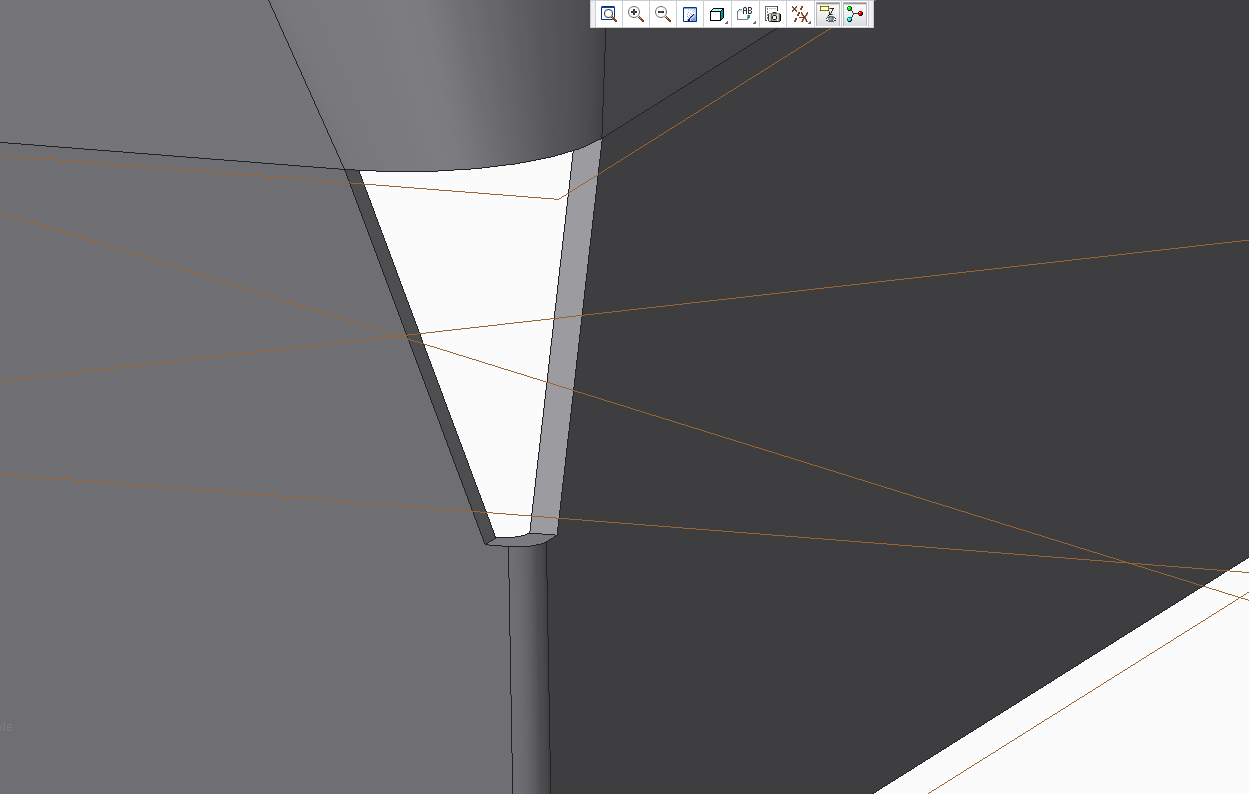
 

model.png


This thread is inactive and closed by the PTC Community Management Team. If you would like to provide a reply and re-open this thread, please notify the moderator and reference the thread. You may also use "Start a topic" button to ask a new question. Please be sure to include what version of the PTC product you are using so another community member knowledgeable about your version may be able to assist.

9 replies

flampersAuthor
Sep 1, 2016 6:17 AM UTC

Hi Steven.

Thanks for your reply.

I already tried the Boudary blend with Thicken. First off, it made some really confusing looking solids. Now the blend does't work anymore.


The problem is that the point transforms from an ellipse to a circular surface. Apparently, this seems to be a problem with Inventor to make a closed solid 3D model as well. I am going to approach the shape by going from circular to circular. The original shape was made up in an assembly for production where the plates have small gaps. In production they weld the arrangement, so it doesn’t matter. But for my analysis it just won’t work ;).


So I tried to be lazy/practical and use part of their model and make quick adjustments for my analysis. I was wondering if I missed some of Creo’s capabilities to be able to fix this problem as it is.


So I’m curious to know if it’s doable.

I uploaded the model so you can have a look.

Thanks again!

flampersAuthor
Sep 1, 2016 6:24 AM UTC

Hi Steven. How do I upload the model?. I can only find insert i,age/video

Sep 1, 2016 11:03 AM UTC

This link tells you how to upload a model.  How to Attach a File to a Discussion Reply

flampersAuthor
Sep 1, 2016 11:07 AM UTC

Thanks!

flampersAuthor
Sep 1, 2016 11:11 AM UTC

Here is the model

flampersAuthor
Sep 6, 2016 6:46 AM UTC

Hi Steven,

Thanks for the info. I had already tried making the boundary blends on both sides of the surfaces. Because of the thicken surface from the left vertical "wall" the surface blend maintains a tiny gap in the upper left corner. I can't quite seem to get closed surfaces to create a solid from solidify.

You mentioned using the sweep. My knowlegde of this function limits itself to sweep where the trajectory is perpendicular to the sketch. Therfore I'm not quite sure how to make use of the fucntion for this purpose.

Sep 11, 2016 2:06 AM UTC

Just by looking at your picture (and not the model), the top part of the opening appears to be lined up to the tangency of the rads and the bottom is not. Is that on purpose? It seems like it would blend a lot easier if top and bottom were similar.