
Jun 9, 2017 12:35 PM UTC
Solved

How to change the arrow size in Creo 3.0?? and also the tail length of an arrow?

Is there anyway to set the specific arrow size and length for the whole drawing rather than selecting every arrow and changing its dimensions??


Regards,

Syed Ateeq
Jun 9, 2017 5:43 PM UTC

Hi Syed,

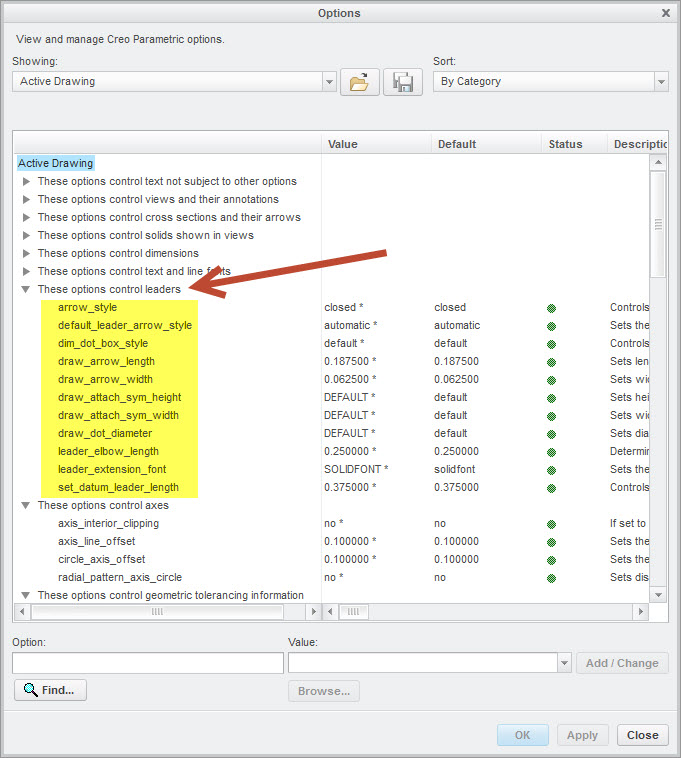
In the drawing, go to File > Prepare > Drawing Properties > Detail Options > change and try changing the following to see if that helps:

dtl_opts.jpg

Thanks,

Amit

3 replies

Jun 9, 2017 5:43 PM UTC

Hi Syed,

In the drawing, go to File > Prepare > Drawing Properties > Detail Options > change and try changing the following to see if that helps:

dtl_opts.jpg

Thanks,

Amit

sateeqAuthor
Jun 10, 2017 7:44 AM UTC

Thanks a lot Amit. It works to change the size and length of the arrow head. But still i couldn't able to change the tail length of the arrow. Is there any option or tool to make the tail length shorter?? I have attached a screenshot below for reference.

Regards,

Syed

Jun 10, 2017 1:21 PM UTC

Witness_line_delta