
Nov 11, 2011 12:14 PM UTC
Solved

how do you contol layers for individual views in drawings

Hi,

How do I turn of off a layer in drawing mode for one view but not in the other views? For example I want to see a particular feature on the front projection which I have assigned to layer A, but for the top projection I do not wish to see that feature so I would like Layer A to be turned off for the top projection.

Another example would be to have layer A turned on in sheet 1, but turned off on sheet 2

I would really appreciate some help
Nov 11, 2011 7:26 PM UTC

Hi Jayme...

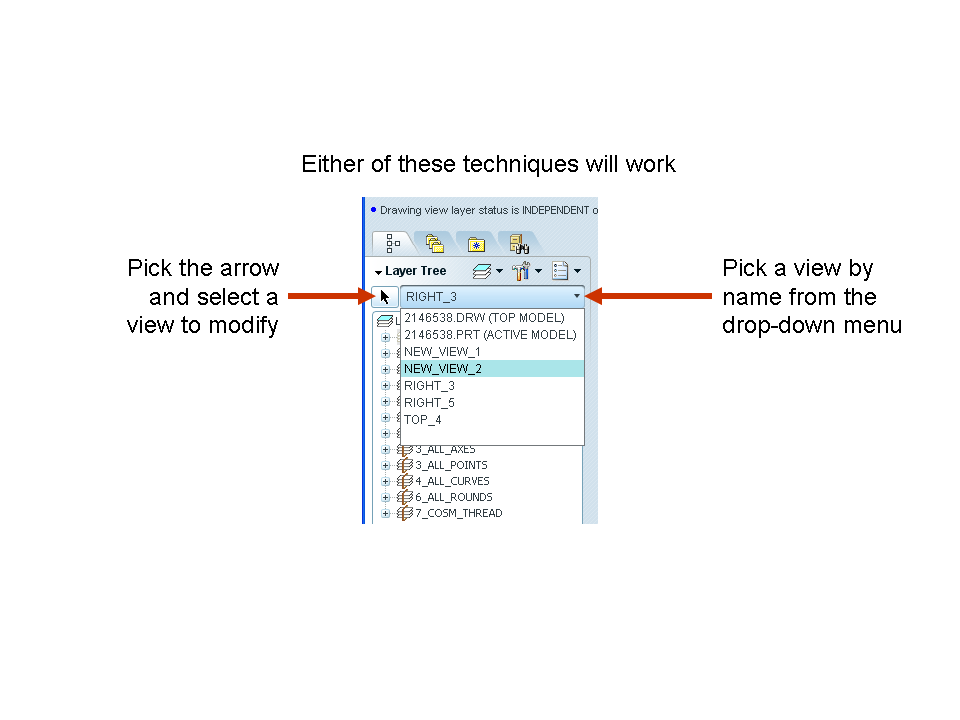
Simply turn on your Layer Tree. From the top drop down menu in the tree (pictured below), select the name of the view you want to modify. Often the view names are nondescript (although you can name them if you wish). If you don't know the name of the view, pick the arrowhead next to the drop-down menu and then highlight and pick the view. Once this is done, you can modify layers that only affect one view at a time while leaving the others intact.

Pick the graphic below to see a much larger version that shows the items to select.

Hope this helps!!

Thanks!

-Brian

layer_question.png

3 replies

Nov 11, 2011 7:26 PM UTC

Hi Jayme...

Simply turn on your Layer Tree. From the top drop down menu in the tree (pictured below), select the name of the view you want to modify. Often the view names are nondescript (although you can name them if you wish). If you don't know the name of the view, pick the arrowhead next to the drop-down menu and then highlight and pick the view. Once this is done, you can modify layers that only affect one view at a time while leaving the others intact.

Pick the graphic below to see a much larger version that shows the items to select.

Hope this helps!!

Thanks!

-Brian

layer_question.png

Sep 29, 2017 2:24 AM UTC

Thanks for your past post Brian.

Despite that I have done this before I had forgotten so came looking.  Just that thing to remember when hardly ever used...

Regards, Brent

Nov 12, 2011 1:06 AM UTC

Thanks Brian, that did the trick!