Mar 12, 2020 6:43 PM UTC
Solved

How do I change which side the dimension is referencing from?

I am trying to remake a model I have in fusion 360 in Creo and This tool is seriously infuriating me. This is why I am turning to the community for help.


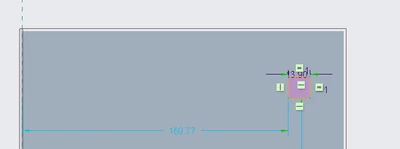
I am trying to dimension a square so that it is 5.5mm from the line on the right but creo automatically selects the line on the left and I have spent a good hour trying to change it so that it references from the right but I can't figure it out. The dimensionning tool IN GENERAL, doesn't ever work. I have never been able to click on it, then click on a segment I want to dimension and have it complete successfully.


Please, someone help me, am I dumb or is it the software that's dumb?


help
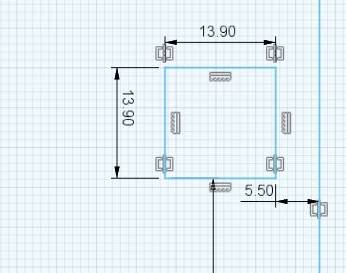
 

fusion 360.png

Creo.png

Gnbay2Answer
Mar 12, 2020 7:05 PM UTC

omg I just figured out how to use that tool, I still hold my claim that it's slightly, weird that you have to middle click to get the dimension you want, why not just left click the first then left click the second like every other cad software?


SOLUTION: click dimension tool, left click on the thing you want to dimension / the two lines that encapsulate the space you want to dimension. Then, MIDDLE CLICK and you have the desired dimension

4 replies

Gnbay2Author
Mar 12, 2020 6:57 PM UTC

I managed to get something working, I notices that there were dashed lines on that left side, I got rid of them, added one on the right and a dimension popped up. 


Why create a dimension tool if it doesn't work?

Gnbay2AuthorAnswer
Mar 12, 2020 7:05 PM UTC

omg I just figured out how to use that tool, I still hold my claim that it's slightly, weird that you have to middle click to get the dimension you want, why not just left click the first then left click the second like every other cad software?


SOLUTION: click dimension tool, left click on the thing you want to dimension / the two lines that encapsulate the space you want to dimension. Then, MIDDLE CLICK and you have the desired dimension

Mar 13, 2020 10:56 AM UTC

The desired technique you describe is how it *used* to work. But the disease of trying to make everything work the same way as Windows infected Creo and now we have what you were forced to do. The efficiency of working with Creo has been diminished so that someone new could (allegedly) have an easier time of it for their first two weeks.

Oh well.