
May 24, 2017 3:17 PM UTC
Solved

How can you search for rounded dimensions in a drawing?

The problem is this:

rounded dimensions are causing problems

no known way to search for which dimensions are rounded and which are not except by opening ever dimensions properties

all new drawings have config setup to have rounded dimension value deselected but checking drawings that have had changes made by others without this config activated brings up the issue.

Possible solution to the problem:

finding a way to search dimension that have been rounded.
StephenWAnswer
May 24, 2017 3:24 PM UTC

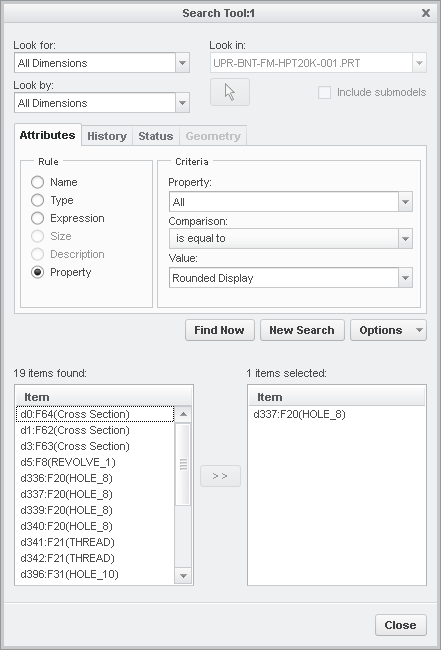
In creo 3 (not sure about other releases), go to the find tool, look for: all dimensions, look by: all dimensions, set attributes to property, one of the values is "rounded display"

2 replies

StephenWAnswer
May 24, 2017 3:24 PM UTC

In creo 3 (not sure about other releases), go to the find tool, look for: all dimensions, look by: all dimensions, set attributes to property, one of the values is "rounded display"

cwarnockAuthor
May 24, 2017 3:36 PM UTC

Exactly what I was looking for. thanks a ton!