
Mar 15, 2017 8:49 AM UTC
Solved

How can I find irrational dimensions? e.g. 1.242354363

I've recently received several Creo models and drawings. In a few drawings I've noticed that while some dimensions are displayed as 5.00 they are actually 5.001325334....


Is there anyway I can quickly find such dimensions without having to manually interrogate each one? I can then fix these dimensions in the model.
mbonkaAnswer
Mar 15, 2017 9:48 AM UTC

Hello rhudd

try following in drawing space.

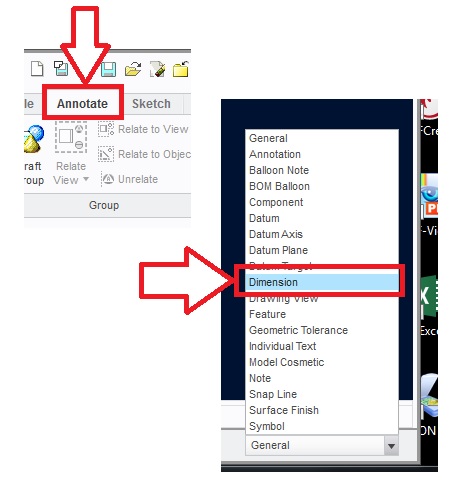
1. Active Annotate bar - set filter to dimmension (right bottom corner)

01-set_filter.jpg

2.  Select all dimmensions in your drawing (with mouse)

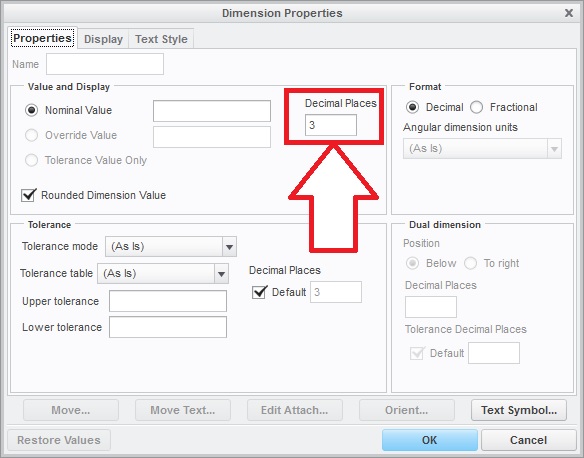
3. Press RMB - select properties - set decimal places to 30

02-decimal_places.jpg

4. Find "bad" dimmensions


Hope it can help

Regards

Milan Bonka

2 replies

mbonkaAnswer
Mar 15, 2017 9:48 AM UTC

Hello rhudd

try following in drawing space.

1. Active Annotate bar - set filter to dimmension (right bottom corner)

01-set_filter.jpg

2.  Select all dimmensions in your drawing (with mouse)

3. Press RMB - select properties - set decimal places to 30

02-decimal_places.jpg

4. Find "bad" dimmensions


Hope it can help

Regards

Milan Bonka

rhuddAuthor
Mar 15, 2017 2:21 PM UTC

Thanks for the suggestion, this is a nice approach that works well.