Nov 17, 2022 8:59 PM UTC

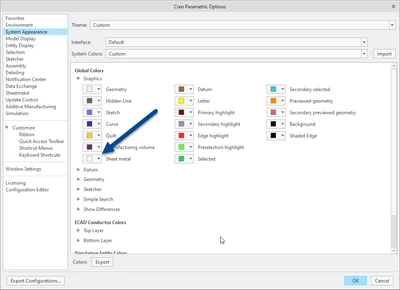
I think you can change the display of sheet metal in the options menu. 


Tdaugherty_1-1668718455469.png


It does seem like this doesn't work exactly like I thought though. When I set the setting to white, the driving surface of my sheet metal part displays with white edges. The other edges don't though. 


Tdaugherty_2-1668718564716.png


I thought that this might be related to the default appearance of my start part being green. I changed that next. I also added a few flanges to see what happens. This is the result:


Tdaugherty_3-1668718666072.png


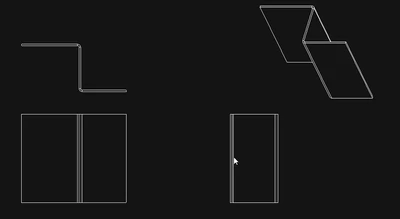
Here's the drawing display as well:


Tdaugherty_4-1668718698214.png


I think this might be what you want but you'll have to play with it yourself. 


3 replies

Nov 17, 2022 8:59 PM UTC

I think you can change the display of sheet metal in the options menu. 


Tdaugherty_1-1668718455469.png


It does seem like this doesn't work exactly like I thought though. When I set the setting to white, the driving surface of my sheet metal part displays with white edges. The other edges don't though. 


Tdaugherty_2-1668718564716.png


I thought that this might be related to the default appearance of my start part being green. I changed that next. I also added a few flanges to see what happens. This is the result:


Tdaugherty_3-1668718666072.png


Here's the drawing display as well:


Tdaugherty_4-1668718698214.png


I think this might be what you want but you'll have to play with it yourself. 


Nov 22, 2022 8:02 PM UTC

So far from what I can tell this has solved the issue with green showing up in .pdfs.

Thanks,


Nov 18, 2022 12:11 PM UTC

Hi,

Creo 7.0.5.0

s1export.png >>> dwg file in s1export.zip

s2export.png >>> dwg file in s2export.zip