
Dec 9, 2016 9:52 AM UTC
Question

Feature control frame in revision column.

i have created feature control frame as a free note & mention in revision column. but when I suppose to add a new row the location gets disturb. How can I make same as parametric so that when I will add or delete any row its should be in that particular row.

Please refer condition 1 & condition 2
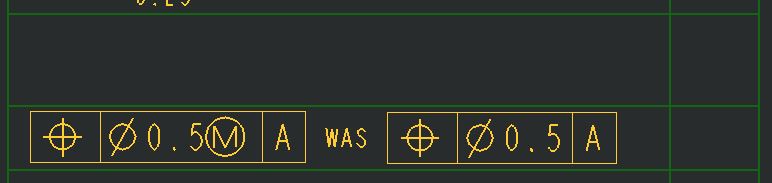
condition-1.JPG

Condition-2: After adding extra row, original location shifts

 

condition-2.JPG


This thread is inactive and closed by the PTC Community Management Team. If you would like to provide a reply and re-open this thread, please notify the moderator and reference the thread. You may also use "Start a topic" button to ask a new question. Please be sure to include what version of the PTC product you are using so another community member knowledgeable about your version may be able to assist.

4 replies

Dec 9, 2016 8:05 PM UTC

If you are creating the FCF with dumb text, you can just create it inside of the table cell. The other option would be to create it as a GTOL, place it as a free note, call it in the table using &g## syntax where ## is the GTOL ID, then delete the free note GTOL.

achopadeAuthor
Dec 12, 2016 10:54 AM UTC

Hello Roger,

Thanks for reply, I have tried the second option (call it in the table using &g## syntax where ## is the GTOL ID, then delete the free note GTOL.) but its not working.

will you please elaborate same?

Dec 12, 2016 7:29 PM UTC

Ashwin,

Where are you getting stuck? Once you have the GTOL as a free note, hovering over it will give you the ID, then use that same ID in the table cell:

gtol1.jpg

Table cell will look like this:

gtol2.jpg

You can then delete or erase the GTOL that is floating in empty space - the one in the table cell will stay there.

Thanks,

Roger