
Jun 1, 2020 12:31 PM UTC
Solved

Family table pattern is intermittent

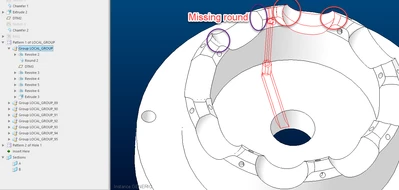
I have a pattern in a family table the does not work correctly.  The group is shown below in red, but the round does not get pulled through to all the pattern members.  The model below is the generic.
 

Mike6_1-1591013849629.png


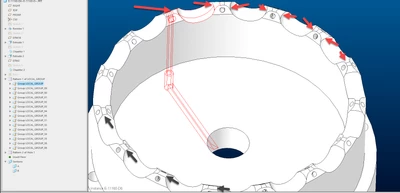
Below is another instance from the family table where the pattern worked for about half of the pattern, then stopped.  
Mike6_2-1591014492074.png

I would appreciate any thoughts.  Thanks


Jun 1, 2020 1:04 PM UTC

This appears to be related to the reference geometry not maintaining the references as it clocks around.   Semi-circular geometry also causing some headahces due to that I think.


If you are using edge-rounds - that can be a problem in situations like this.   


Try a Surf-To-Surf round instead.  That should work better for your transitions.


Dave

3 replies

Jun 1, 2020 1:04 PM UTC

This appears to be related to the reference geometry not maintaining the references as it clocks around.   Semi-circular geometry also causing some headahces due to that I think.


If you are using edge-rounds - that can be a problem in situations like this.   


Try a Surf-To-Surf round instead.  That should work better for your transitions.


Dave

Mike6Author
Jun 2, 2020 6:21 PM UTC

David, this worked.  Thanks

Jun 1, 2020 1:16 PM UTC

@Mike6 wrote:

I have a pattern in a family table the does not work correctly.  The group is shown below in red, but the round does not get pulled through to all the pattern members.  The model below is the generic.


Mike6_1-1591013849629.png


Below is another instance from the family table where the pattern worked for about half of the pattern, then stopped.  

Mike6_2-1591014492074.png

I would appreciate any thoughts.  Thanks


Hi,

tip: create one-eighth of the rotational geometry and pattern this geometry using Geometry Pattern.