
Jun 21, 2022 4:25 PM UTC
Solved

Extrude axis Hide/Unhide visibility

Hello dear members, what are the ways in which I can hide and unhide the axis created by Extrusion? (The Axis display command controls the visibility of all axis together, I would like to control visibility for particular extrude feature). I tried to select the axis and did Hide, how can I unhide it again? Thanks.
tbraxtonAnswer
Jun 21, 2022 4:36 PM UTC

You can filter the display of features and datums by using layers. Organize your layers as required to filter the display needed.


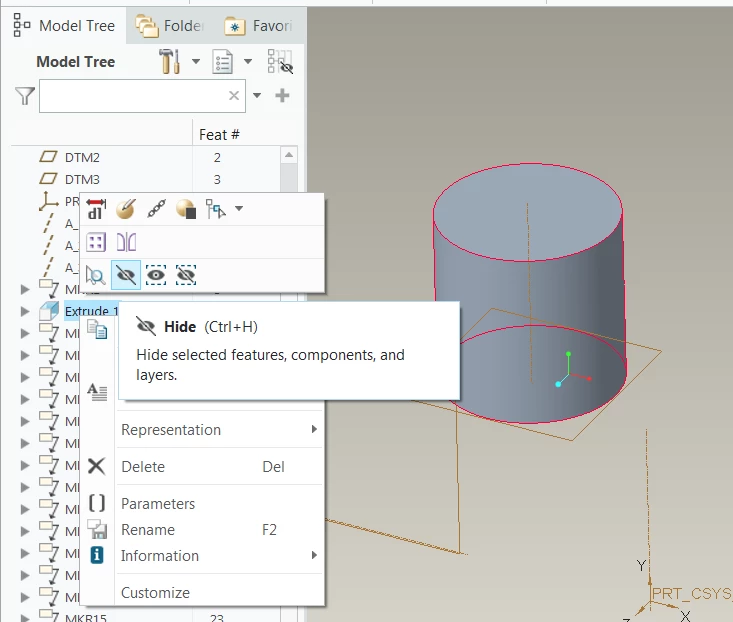
Note that for an axis created by an extruded feature you will need to select the feature and not the axis to control the display. By hiding the extrude feature the axis will not be displayed but the geometry will still appear.


Example shown here using the RMB to hide the feature in the model tree.

tbraxton_0-1655829352193.png


3 replies

Jun 21, 2022 4:35 PM UTC

go to the layer tree and look under "hidden items". You can select the axis and unhide it.

tbraxtonAnswer
Jun 21, 2022 4:36 PM UTC

You can filter the display of features and datums by using layers. Organize your layers as required to filter the display needed.


Note that for an axis created by an extruded feature you will need to select the feature and not the axis to control the display. By hiding the extrude feature the axis will not be displayed but the geometry will still appear.


Example shown here using the RMB to hide the feature in the model tree.

tbraxton_0-1655829352193.png


umgAuthor
Jun 21, 2022 5:01 PM UTC

Thanks @tbraxton , that will work.