Mar 6, 2020 2:30 PM UTC
Solved

Exporting a step file but also getting all the hidden trim surfaces

While exporting some step files and then importing them, all the extra trim surface that are hidden are coming along with the part. This doesn't work when you are trying to render some parts. Is there a way to have these extra surface remove during the creation of a step file?
Mar 6, 2020 3:01 PM UTC

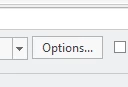
When exporting a .stp file. Click on the Options button 

Dale_Rosema_0-1583506526390.png


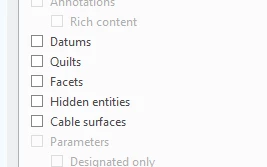
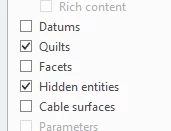
Then uncheck the quilts and hidden entities

Dale_Rosema_1-1583506591898.png     Dale_Rosema_2-1583506615156.png


If I save profile, it want to add "def_profile.dep_step"

Where is this file normally located.


This does remove all the extra surface.


3 replies

Mar 6, 2020 2:40 PM UTC

@Dale_Rosema


I think Tom's reply to this post will help you. 

Dale_RosemaAuthorAnswer
Mar 6, 2020 3:01 PM UTC

When exporting a .stp file. Click on the Options button 

Dale_Rosema_0-1583506526390.png


Then uncheck the quilts and hidden entities

Dale_Rosema_1-1583506591898.png     Dale_Rosema_2-1583506615156.png


If I save profile, it want to add "def_profile.dep_step"

Where is this file normally located.


This does remove all the extra surface.


Mar 6, 2020 4:19 PM UTC

You can save that to any location and set export_profiles_step to read profiles from that directory.