
Aug 12, 2015 9:18 AM UTC
Solved

Export STEP File

Morning All

Having issue with exporting an assembly as a STP file and creating a solid.

Have trawled help, forums and interweb for info and I still see the structure of the assembly when I open the STP file in a separate application.

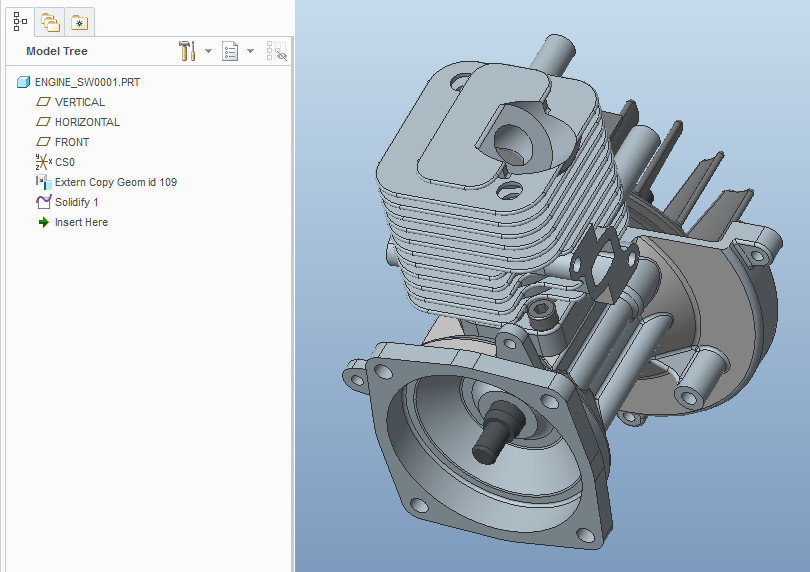
So far  I have shrinkwrapped the assembly then saved the shrinkwrap as a STP file, this opens as a single part but you can still see the structure.

I've tried suggestions such as surface only and the problem remains. We are using Creo 2.0 M120.

Any suggestions?

Many Thanks
Aug 12, 2015 10:02 AM UTC

Hi Phil,

if you need to create a step file without an assembly structure try to use this steps:

  1. Open asm and create flat assembly structure - move all components into main assembly (remove subassemblies) = Restructure components to main assembly
  2. Create a Shrinkwrap model
  3. Open the Shrinkwrap
    sw-part.png
  4. Save it as STP (solid+Shells)
  5. Check the STP file - it is only one part / without structure

Regards,

Vladimir

9 replies

Aug 12, 2015 10:02 AM UTC

Hi Phil,

if you need to create a step file without an assembly structure try to use this steps:

  1. Open asm and create flat assembly structure - move all components into main assembly (remove subassemblies) = Restructure components to main assembly
  2. Create a Shrinkwrap model
  3. Open the Shrinkwrap
    sw-part.png
  4. Save it as STP (solid+Shells)
  5. Check the STP file - it is only one part / without structure

Regards,

Vladimir

Feb 8, 2019 2:37 AM UTC

I tried, however, when the STEP (STP) file is imported by cliking "assembly" it bring all the parts and whole assembly structure is there.  however, i have seen in past that STEP file has only one part of the whole assembly.

will give another try

Feb 8, 2019 8:48 AM UTC
You can try importing the STEP file as a part instead of assembly (you can do that, simply change import option from Assembly to Part) and then export model to STEP again. That way next time it will be imported as a single part without showing the assembly structure.