
Jul 10, 2023 5:32 PM UTC
Question

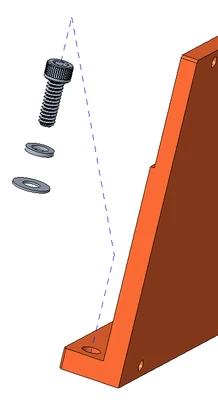
exploded lines are going in wrong direction

Folks, I'm currently using CREO 7. Exploded lines are shown below. This has been happening to me for many years depending on the stackup and regardless of CREO version. I thought this was a bug that would have been fixed by now, but I'm thinking either it's me or its a bug no-one cares about. How can I rectify this? Thank you.
wbottis_0-1689010116670.png


4 replies

Jul 10, 2023 6:05 PM UTC

I don't use them much at all but I seem to remember someone telling me that the direction is dependent on where you select (which part of the cylinder or axis), maybe top or bottom of the cylinder.

I did not verify at all so please feel free to debunk my rumor spreading! 😂🤣😅

Jul 10, 2023 6:05 PM UTC

This is a frustrating behavior that still has not been addressed, even though it has been requested to be fixed in Creo Ideas years ago. Smart Explode line - Assembly mode 


I swear it depends on where on the cylinder you pick and when on the screen you pick to accept the creation.  But I still don't have it figured out.  The only foolproof method I know of is to show axis and select ends of axis rather than a cylindrical surface.

wbottisAuthor
Jul 11, 2023 12:54 PM UTC

Imagine knowing about this for over a decade and not resolving it.

Jul 11, 2023 1:29 PM UTC

If they could only find some time to add a direction arrow to the explode line, it would save the users thousands of hours every year.


But they do have an arrow to flip, only if you select a curve or edge.  Shouldn't be too hard to expand that capability.