Jan 15, 2020 7:36 PM UTC
Question

Dual Dimension Displacing Suffix in Dimension Text

Hey, 

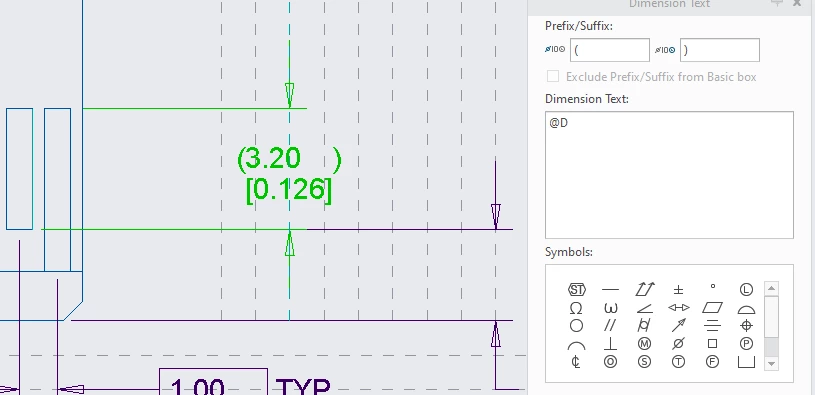
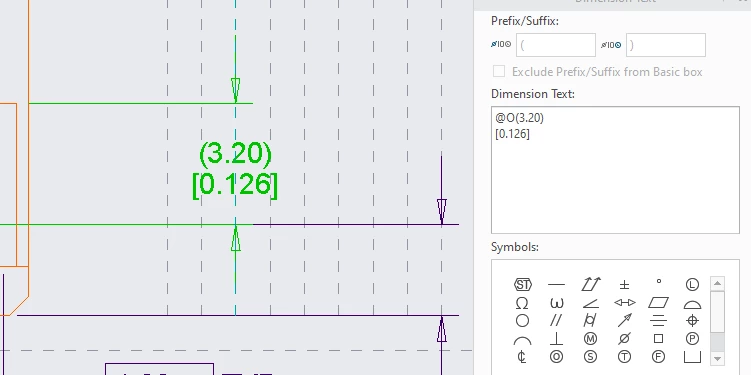
I'm trying to find a way to keep a reference dimensions looking like (3.20) instead of (3.20    ) when I use dual dimensions. The only fix I've found so far is to manually override the dimension, but that's a pretty terrible solution. There should exist a way to prevent this formatting error through the software setting. 

Photo attached below to show what I'm talking about. 

Any advice on this is welcome! 

Thanks! Dual_Dim_good.PNGDual_Dim_error.PNG
4 replies

Jan 15, 2020 7:43 PM UTC
Novus_TomAuthor
Jan 15, 2020 8:31 PM UTC

The "Suggest an idea" button is grayed out, so I'm guessing I don't have the right license to use that feature of PTC community. However, this seems more like a bug that needs fixing than a new feature to be added.

Jan 16, 2020 7:08 AM UTC

Hi,

I suggest you to report the problem to PTC Support.


From my point of view the problem is related to drawing option dual_dimension_brackets.

1.]

If drawing option dual_dimension_brackets yes is set then extra space is displayed before right parenthesis in primary value. This is because right parenthesis is placed after right bracket displayed in secondary value.

2.]

If drawing option dual_dimension_brackets no is set then brackets are not displayed in secondary value and right parenthesis is placed correctly.