Dec 16, 2013 11:01 AM UTC
Solved

Drawing dimensions colour Change

Capture.PNG

Hi folks,

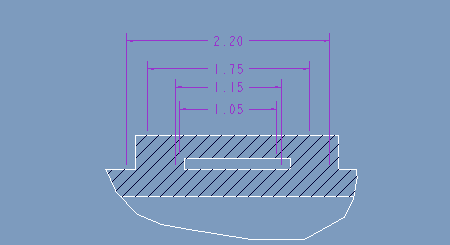
Can we change this dimensions colors?

AraviK1Answer
Dec 16, 2013 11:53 AM UTC

Capture.PNG

10 replies

AraviK1AuthorAnswer
Dec 16, 2013 11:53 AM UTC

Capture.PNG

AraviK1Author
Dec 16, 2013 11:58 AM UTC

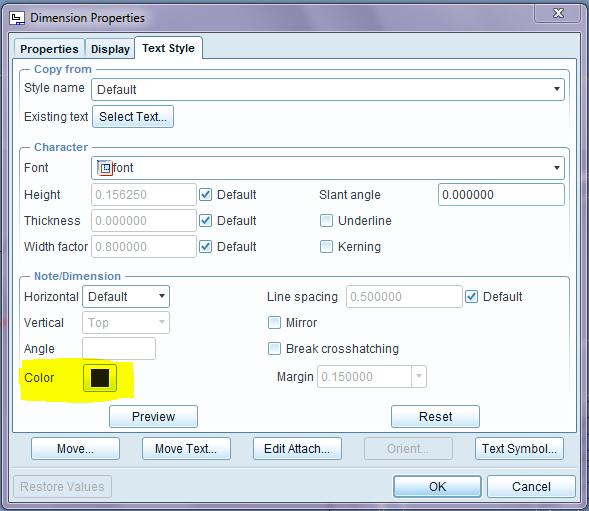
I am trying to change color here. But not changing 😞

Dec 16, 2013 3:58 PM UTC

The color is the same as that given created dimensions that have lost references.

If references are missing (there should have been a message that said references are missing): Select one and then right click - edit attachment and pick suitable replacements for the missing references.

AraviK1Author
Dec 17, 2013 3:27 AM UTC

Yes David, You are right. I agrre with you.

But if any case is there any chance to change that color or not?

sometimes its usefull to me.

AraviK

Sep 5, 2019 7:45 PM UTC

In the System Appearance Menu -> Global Colors -> Graphics -> Change the "Manufacturing Volume" color.

Yes, I agree, cuz that makes sense?!?

Feb 18, 2020 4:11 PM UTC

That is daft.

The entity descriptions are so cryptic!

Thanks for helping, I needed to change color of failed dims because I am color retarded.