Nov 7, 2017 4:57 PM UTC
Solved

Datum Planes shown in Drawing

I am new to Creo & wondering how t erase the datum planes that are in this drawing view. The assembly drawing was copied from an existing Wildfire drawing. I would have just chosen to erase all from the view previously.  I do not see where there is an option to erase all.

StephenWAnswer
Nov 7, 2017 6:41 PM UTC

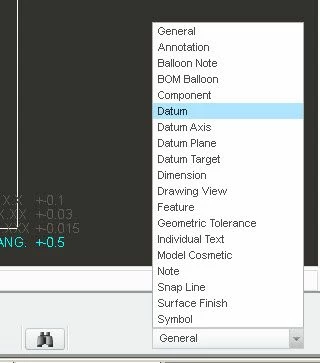
Set the filter in the lower right to datum and then drag a window around all the view.

Also, if you have maintenance, vote for this IDEA.

https://community.ptc.com/t5/Creo-Ideas/quot-Set-Datums-quot-should-be-hidden-by-default-when-placing-a/idi-p/460708/jump-to/first-unread-message

datum-filter.jpg

4 replies

Nov 7, 2017 6:20 PM UTC

Those old datums are the bane of my existance.

...and the primary reason I don't use PTC's GD&T functionality.


Can you simply "erase" them in the drawing view?


Nov 7, 2017 6:27 PM UTC

I am picking them one by one to erase, just thought I should be able to erase all by view like we used to be able to. It's very tedious when you have some many to get rid of.

StephenWAnswer
Nov 7, 2017 6:41 PM UTC

Set the filter in the lower right to datum and then drag a window around all the view.

Also, if you have maintenance, vote for this IDEA.

https://community.ptc.com/t5/Creo-Ideas/quot-Set-Datums-quot-should-be-hidden-by-default-when-placing-a/idi-p/460708/jump-to/first-unread-message

datum-filter.jpg

Nov 7, 2017 6:46 PM UTC

Thank you - that worked great. I will vote for idea as well.