Oct 6, 2023 11:28 AM UTC
Solved

Crosshatching inside fastener

Hello!

I have a problem in the drawing. The base part's crosshatching
hanging in space inside my fasteners.

The holes are made in the assembly
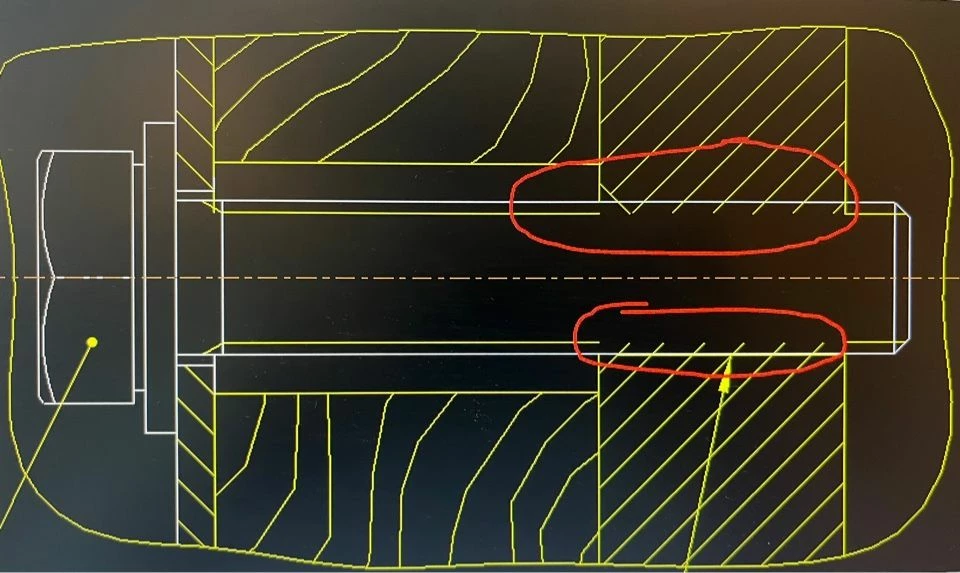
image-06-10-23-02-23.jpeg


Oct 11, 2023 8:41 AM UTC

The solution required turning off the thread in the hole and adding a surface thread separately

8 replies

Oct 6, 2023 2:03 PM UTC

What version of Creo are you using?

What happens if you make the holes in the detail part?

Oct 6, 2023 2:14 PM UTC

Hello

5.0.4.0

The holes must be made in the assembly


Oct 6, 2023 2:59 PM UTC

Can you zip the drawing and upload it to see if the same thing happens in a newer version of Creo?


Oct 6, 2023 2:40 PM UTC

It looks like a tapped hole. There is not a good solution for the way creo shows the solid model for tapped holes and the solid for threaded fasteners.

What you have shown is what is typically on my drawings with the exception that I erase cosmetic threads in assembly drawings just to eliminate those extra lines in the assembly drawing.


Oct 6, 2023 3:59 PM UTC

No improvement in Creo 9.0.,5.0.

PTC needs to improve their algorithm for cross hatching of threaded holes if there is a fastener in the hole. Currently the hatching is going to the hole diameter, which is usually modelled at the minor diameter. The hatching needs to stop at the major diameter, which the software should know. 

Oct 10, 2023 10:34 AM UTC

Another issue is the fact since that the screw and the hole overlap, you get lots of interferences when you're doing a Global Interference analysis, making it much more cumbersome to identify any real problem areas.

HozaibergenAuthorAnswer
Oct 11, 2023 8:41 AM UTC

The solution required turning off the thread in the hole and adding a surface thread separately

Oct 11, 2023 10:56 AM UTC

To help other users in the future, can you give more details to what you did? Adding a surface thread doesn't seem like it would affect the crosshatching?
