
Nov 18, 2021 3:25 PM UTC
Solved

Cross-section view is not normal to its cutting planes

How to create this simple cross-section view correctly? (Note: the presented section view is wrong, it should be normal to its cutting planes). I know there is a procedure to make it somewhere buried in document. However, how to find this HELP is also not a simple task. 


Is any kind of this problem need one day to solve? 
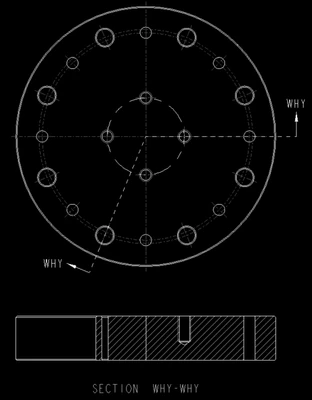
JS_9824412_0-1637246001456.png

In SolidWorks, pertinent Helps are available at one click, not like in CREO, in which I have to be well educated before I can type in the correct keywords to find a Help.

StephenWAnswer
Nov 18, 2021 3:32 PM UTC

8 replies

Nov 18, 2021 3:29 PM UTC

Are you asking how to rotate the view so that you're looking at it from this direction (in both views)?

TomU_0-1637249311551.png


Nov 18, 2021 3:41 PM UTC

Cross-section view should be like the below. It is some sort of standard.

JS_9824412_0-1637250040021.png


StephenWAnswer
Nov 18, 2021 3:32 PM UTC
Nov 18, 2021 3:51 PM UTC

Thanks for the link, in which I found the keywords such as "unfold" that is only available if it is in "general view", not in "projection view".


So now, the problem is solved. 


Thanks.

P.S. Why CREO is so difficult to use?


Nov 18, 2021 4:04 PM UTC

You can use Full Aligned as a projection and it is more likely exactly what you are looking for and is generally for round parts like you have.

Full-unfold may work for this application specifically but may "skew" a view in some cases.


Creo is just that way. It takes effort to learn. I've used it for 20+ years and I still learn new things regularly.

Be positive. Have an open mind. Don't try to use it like solidworks or inventor or whatever you used before or you will go crazy and just get madder and madder. Ask questions, we are always willing to help.


StephenWilliams_0-1637251557272.png