
Nov 23, 2016 2:23 PM UTC
Question

Creo Simulate pin constraint problem

Hi,

Maybe someone can help me understand this:

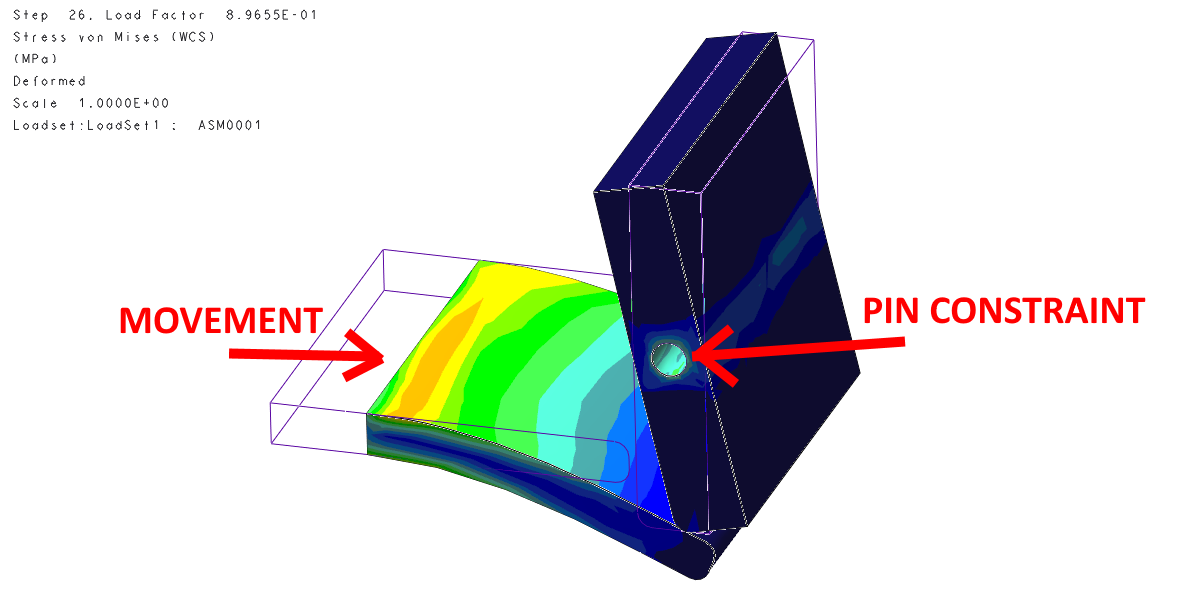
I've tried recently to simulate a click effect on a custom-built connector and had problem with Creo Simulate.

This is simple assembly just to show the problem.

One part is  constrained with pin constraint but  when viewing simulate results it seems not to turn but tries to return to start position like on a spring.

Pushing part just turns it a little and then slides below it. First i thought friction is the problem but its not.

Am I not understanding what pin constraint in Simulate actually does?
1.png

Attached are avi of simulate result and assembly.

4 replies

Nov 23, 2016 2:57 PM UTC

Perhaps you're running LDA(large deformation analysis)!

Nov 23, 2016 8:00 PM UTC

Yes, but without large deformations I can`t use finite friction. And when I don`t use large deformations without friction I still get similar result.

Nov 24, 2016 4:39 AM UTC

The large deformation analysis is the very real deformation,that's right!  Another reason for this result is the load you use(grav)!

Nov 24, 2016 8:53 AM UTC

We've seen other issues to do with large rotations and LDA (Enforced displacement, tangential direction, more than 1 revolution).

Just to see what happens, try creating a point at the centre of your pin; creating a rigid link from the hole bore to the point; and constraining the point in all translations and two rotations - just leaving the rotation about the hole axis free.