Jun 21, 2017 7:20 PM UTC
Question

Creo 3 - Draft multiple protrusions

Hello all,

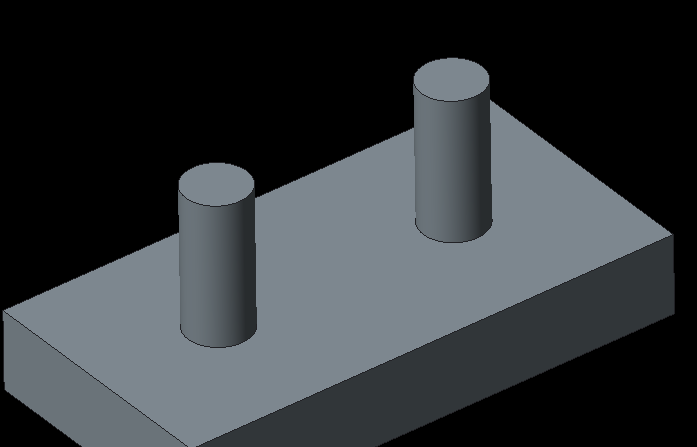
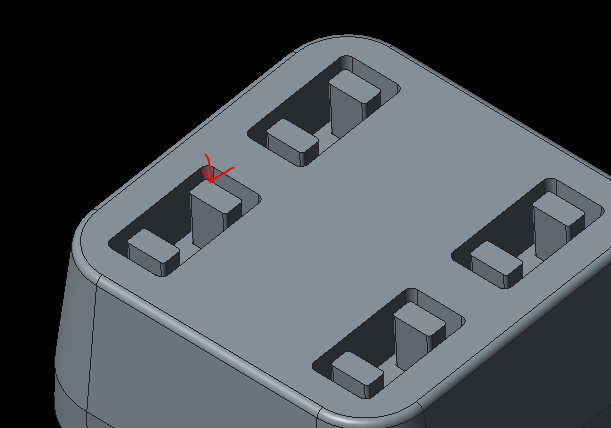
I have been trying to find a way to draft multiple protrusions all at once. Is this possible or will I have to individually draft all these protrusions?

In the screen shot, I need to draft all 8. I have been trying to use Seed/Boundary sets, but no go.

If you know how, please reply with specific steps. I have even tried a simpler model with just 2 posts and I can't find a single draft setup.

Thanks!
    2 replies

    Peter1Author
    Jun 21, 2017 8:55 PM UTC

    Yes, I am. I can put drafts on all 3 posts with 3 draft features, but want to do it in just one feature if possible. I feel like Seed and Boundary should be able to select all those surfaces.

    Jun 30, 2017 6:21 PM UTC

    To use the Seed and Boundary method, you will need to select 2 surfaces where the desired drafted surfaces reside between. For example the top of the pillers and - holding the <SHIFT> key - the surface below the pillers.. Then - with the <ALT>key held down - deselect the top surface. Now, right click and hold - select "Draft Hinges" - and proceed from there.


    Optionally, you could add taper (under the options tab in the extrude dashboard) to the pillers as you extrude them.