Solved
Component's ID
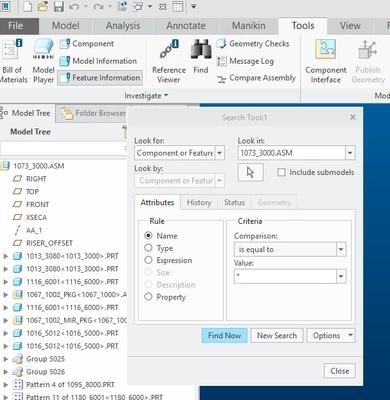
I found a posting that showed how to find a component ID using a search tool. How do you get this tool to "pop-up"?
https://community.ptc.com/t5/Analysis/Search-a-part-by-it-s-ID/m-p/377183
Thanks,
Dale

I found a posting that showed how to find a component ID using a search tool. How do you get this tool to "pop-up"?
https://community.ptc.com/t5/Analysis/Search-a-part-by-it-s-ID/m-p/377183
Thanks,
Dale
Enter your E-mail address. We'll send you an e-mail with instructions to reset your password.