
Apr 25, 2017 3:46 PM UTC
Solved

Change routing of wire that is using Network

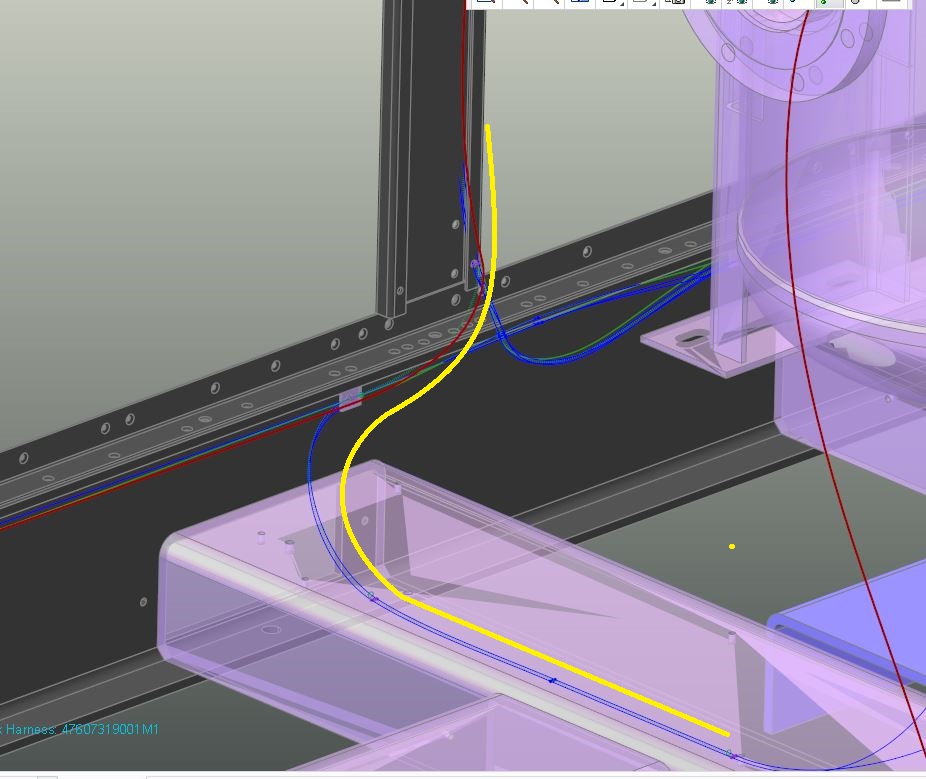
I am very new to creating harnesses and am trying to figure out how to change the routing of a wire that is not routing along the network how I would like it.  In the picture the wire in question is in dark red and the path I want it to take is in yellow.

How do I go about changing that path?

Thanks

Chris
Capture.JPG

lernst-2Answer
Apr 25, 2017 4:12 PM UTC

Hi Chris,

Move your mouse on top of the WIRE that is not following the network path to highlight it.  Once it is highlighted, right mouse click and select "Insert Locations".  Next pick the location point on the network you want to follow, then select the check mark (done).  You will have to do this step several times to ensure it follows the path you want.

Kindest regards,

Lori

6 replies

lernst-2Answer
Apr 25, 2017 4:12 PM UTC

Hi Chris,

Move your mouse on top of the WIRE that is not following the network path to highlight it.  Once it is highlighted, right mouse click and select "Insert Locations".  Next pick the location point on the network you want to follow, then select the check mark (done).  You will have to do this step several times to ensure it follows the path you want.

Kindest regards,

Lori

cleamonAuthor
Apr 25, 2017 4:51 PM UTC

OMG that was too easy.. I was making it harder than it had to be.  haha