Aug 20, 2012 2:34 PM UTC
Solved

Central Model Library - Creo Parametric

I would think that this has to be possible....

I have created a 'model library' of many of our components. When I create an assembly using these components, I need to copy the components to the same folder where the assemblies and drawings are saved, otherwise when I open them the components fail to load.

Is there a setting somewhere that can tell Creo Parametric to look for components in a specific folder rather than the current folder, so that they all don't need to be in the same location?

This would make life much easier!

Thanks in advance for any insight you all may have on this!

- Dave

Aug 20, 2012 3:01 PM UTC

Hi Dave...

Yes, this is possible. You're looking for search paths. This feature gives you the ability to specify a list of directories Creo should check for components. If you load an assembly and a necessary component isn't located in the current working directory, Creo will start running through the search paths to find the missing model.

To specify a search path, you can either add one new line to your Creo configuration file for each new folder you wish to search or you can add one single line to your configuration file that references a separate text file containing many lines.

Technique #1: Add individual lines for each folder

(1) Go to File->Options->Configuration Editor.

(2) Click Add

(3) Type search_path into the option name field of the window that appears (as shown below)

search_path.png

(4) Enter the folder you wish to search in the option value field.

(5) Select OK to add the search path. Repeat this process for each new folder.

Technique #2: Add one line to the config file and reference an external list

(1) Go to File->Options->Configuration Editor.

(2) Click Add

(3) Type search_path_file into the option name field of the window that appears (as shown below)
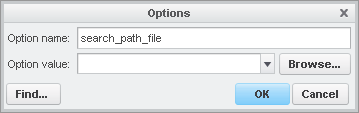
search_path_file.png

(4) Enter the pathname to a search path file into the option value field.

(5) Select OK to add the search path file pointer.

(6)Create/Edit the search path file listing as a text file. A sample text file showing the way to set up a search path file is attached to this message.

Make sure the pathname to the search file you set in Step #4 is correct or Creo won't read your search paths! Consult the help files for search paths for more information.

Let me know if you have any trouble!

Thanks!

-Brian

7 replies

Aug 20, 2012 3:01 PM UTC

Hi Dave...

Yes, this is possible. You're looking for search paths. This feature gives you the ability to specify a list of directories Creo should check for components. If you load an assembly and a necessary component isn't located in the current working directory, Creo will start running through the search paths to find the missing model.

To specify a search path, you can either add one new line to your Creo configuration file for each new folder you wish to search or you can add one single line to your configuration file that references a separate text file containing many lines.

Technique #1: Add individual lines for each folder

(1) Go to File->Options->Configuration Editor.

(2) Click Add

(3) Type search_path into the option name field of the window that appears (as shown below)

search_path.png

(4) Enter the folder you wish to search in the option value field.

(5) Select OK to add the search path. Repeat this process for each new folder.

Technique #2: Add one line to the config file and reference an external list

(1) Go to File->Options->Configuration Editor.

(2) Click Add

(3) Type search_path_file into the option name field of the window that appears (as shown below)

search_path_file.png

(4) Enter the pathname to a search path file into the option value field.

(5) Select OK to add the search path file pointer.

(6)Create/Edit the search path file listing as a text file. A sample text file showing the way to set up a search path file is attached to this message.

Make sure the pathname to the search file you set in Step #4 is correct or Creo won't read your search paths! Consult the help files for search paths for more information.

Let me know if you have any trouble!

Thanks!

-Brian

Daves1Author
Aug 20, 2012 3:17 PM UTC

Wow! I can't thank you enough Brian!

You've just made my life a whole lot easier!

- Dave

Aug 20, 2012 3:32 PM UTC

Always happy to help!

Write back if you get stuck in any way.

Take care...

-Brian

Jun 30, 2017 6:40 PM UTC

Try setting the config.pro (or config.sup) option pro_library_dir.

This option "Sets the default directory for the Creo libraries (or any libraries you have built containing the proper index menu files)."