Jun 15, 2017 11:14 AM UTC
Solved

Cannot Remove Surface From Drawing

Hi,

I have imported a parasolid, which contains some inserts that have been interpreted as surfaces. An issue arises when I come to make the drawing. The inserts are permanently shown in every orientation. The below image shows what it looks like (this is not a section view) and I have tried the normal method of erasing the line using Edge Display but no cooperation from creo.
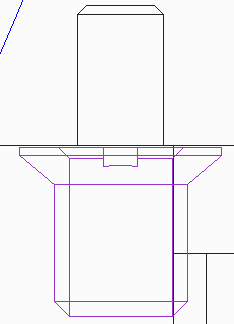
As this is a parasolid, it is all imported as a singular item so am unable to delete the individual faces/bodies.

Is there anything I am not thinking of?

Cheers,

Nick
tgriffinAnswer
Jun 15, 2017 1:27 PM UTC

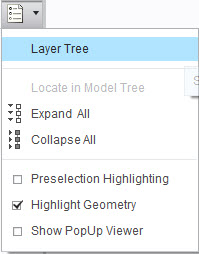
Switch over to your layer tree.

layer tree1.jpg

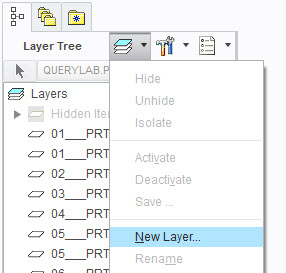
Create a new layer.

layer tree2.jpg

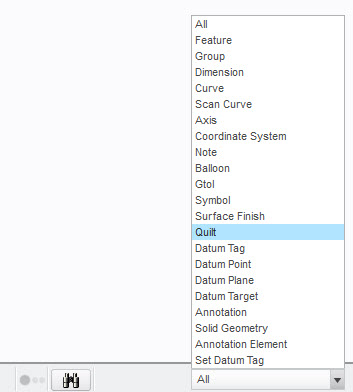
Add the surfaces to your new layer (it might help to utilize your selection filter).

layer tree3.jpg

Then hide the new layer, and save the layer status.

6 replies

Jun 15, 2017 12:39 PM UTC

You can set it so those surfaces are hidden in your layer tree.  If there is not already a layer for them, just create a layer with the surfaces on it and then hide that layer and save the display status.

nhallAuthor
Jun 15, 2017 12:44 PM UTC

Although it is acting like a surface, my model tree only contains an imported feature so no surfaces are actually selectable.

tgriffinAnswer
Jun 15, 2017 1:27 PM UTC

Switch over to your layer tree.

layer tree1.jpg

Create a new layer.

layer tree2.jpg

Add the surfaces to your new layer (it might help to utilize your selection filter).

layer tree3.jpg

Then hide the new layer, and save the layer status.