Apr 30, 2013 11:56 PM UTC
Question

Can you change the line style of an annotation?

Is there a way to change the line style of this annotation to solid?
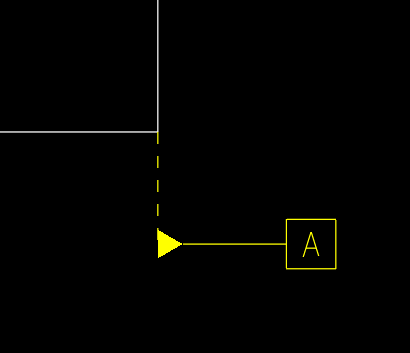
Capture.PNG

    17 replies

    May 1, 2013 7:12 PM UTC

    Hi Ulaengin...

    How did you make this? This type of annotation usually is solid. I'm curious as to how you created it with a dashed line.

    Thanks...

    -Brian

    May 2, 2013 12:47 PM UTC

    I think this is the same picture that was in the hide datum planes discussion that Antonius had the video showing how to make those a different way - annotations.

    ulaenginAuthor
    May 2, 2013 4:50 PM UTC

    It is. Antonius showed me how to make those annotations - which I did, but mine came out with a dashed line instead of solid and I'm trying to figure out how to change it. Antonius didn't know - so I started a new discussion.

    May 2, 2013 9:26 AM UTC

    Hi,

    you can create custom symbol for this example

    Regards,

    Vladimir

    ulaenginAuthor
    May 2, 2013 4:51 PM UTC

    I know I could "fake" in the datums but I want them to come from the model.

    May 2, 2013 7:04 PM UTC

    Sorry but for Gtol system symbol and for Reference plane it is not possible set custom line style

    Regards,

    Vladimir

    May 2, 2013 7:25 PM UTC

    Hi folks

    I think we need to start from beginning: Main question is - why do you need to change line style standard for Standard (ANSI, DIN, ISO etc.) GTOL and Reference plane? Do you use different Standard? Why do you need to customize this?

    Regards,

    Vladimir

    May 2, 2013 7:56 PM UTC

    Are you saying there is a standard that is changing ulaengin's line style?

    May 2, 2013 8:08 PM UTC

    No, I am sorry - I am saying ... Why do "you" (ulaengin) want to change the standard (for GTOL and reference plane) - it is necessary for your engineering design?

    May 11, 2016 6:20 AM UTC

    Hi ulaengin,

    Did you come to know how to change it ?

    Thanks,
    Sumanth

    Mar 5, 2020 3:35 AM UTC

    I too have the same problem. It seems that if we add the datum symbol from Show model annotations, we get this dotted line, whereas if we add it manually in the drawing, we get a solid line. Does anybody have any solution to this?

    Jul 27, 2020 3:41 PM UTC

    Yes you can change the leader line extension. In the drawing go to File, Prepare, Drawing properties. In the configuration file look for "leader_extension_font". Set the option in the value window by typing "solidfont". Hit apply

    Good Luck
