
Jul 18, 2023 6:35 PM UTC
Solved

Can I change a part number to a new part number directly while in an Assembly without doin a save as

Hey Everyone!


Wondering if someone has a work around or know how of this. Sometimes I need to take a standard part that is in my assembly like a panel that is blank and then while doing the design I may need to add a bulkhead of cut out later down the road. The way I do it now is to do a "save as" delete the other part and reassembly the new saved part in its place. I am using a library parts and what we do now is a save as of the whole assembly effectively giving every part a new number which is monotonous and using more parts number then we would like every time.  Is there a way to save a new part number to an Assembly part in the tree without doing the "Save As" every time? Hope this makes sense, using Creo 9
kdirthAnswer
Jul 18, 2023 6:40 PM UTC

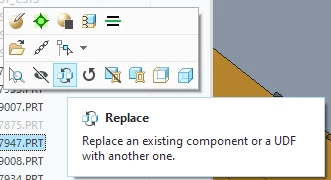
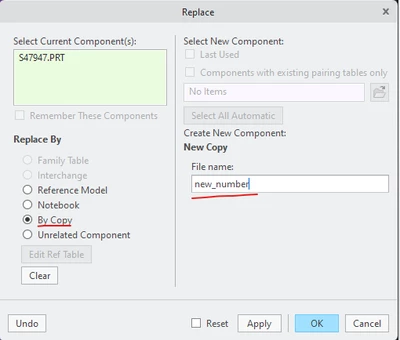
Have you tried Replace By Copy?

kdirth_0-1689705590097.pngkdirth_1-1689705631236.png


4 replies

kdirthAnswer
Jul 18, 2023 6:40 PM UTC

Have you tried Replace By Copy?

kdirth_0-1689705590097.pngkdirth_1-1689705631236.png


Jul 18, 2023 6:42 PM UTC

If the model must have a unique file name, then you must save it at some point in the process.


One alternative is to rename the part in session and then save it. By renaming it in session the part can be given a new unique name while in session and when saved will use the new name.


This would save you the deletion and replacement of the part in the assembly when you need to create a "new" part.

Jul 18, 2023 6:44 PM UTC

If you are using Windchill, you can use save as from within windchill and use the "next" button and you can copy and replace at the same time.

jeuclideAuthor
Jul 18, 2023 6:50 PM UTC

Thank you everone!