Jan 30, 2017 4:27 PM UTC
Solved

Boundary Blend (creo 3.0)

Hello guys,

        I would like to know whether we can close that portion using Boundary Blend. I know we can use fill command and style surface to close it but I want to know whether we can fill it using BB if so can you tell the step by step to do so in Boundary blend.
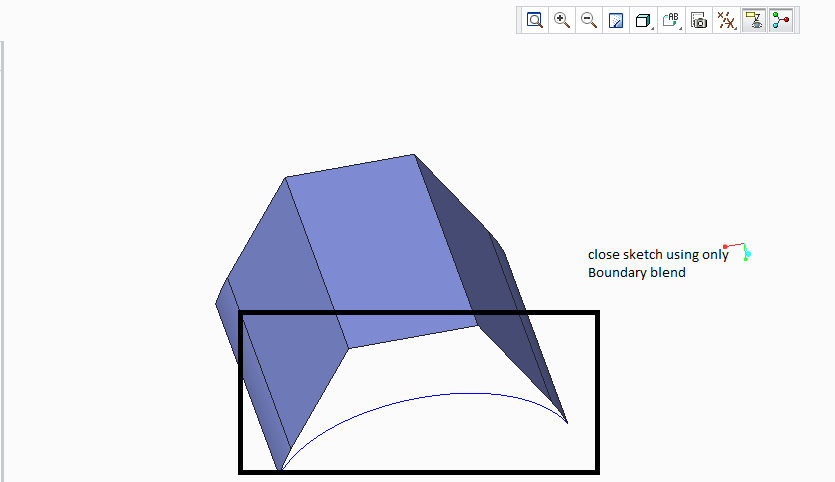
BB.png

Thank you

Babu

rsobeckiAnswer
Jan 30, 2017 8:32 PM UTC

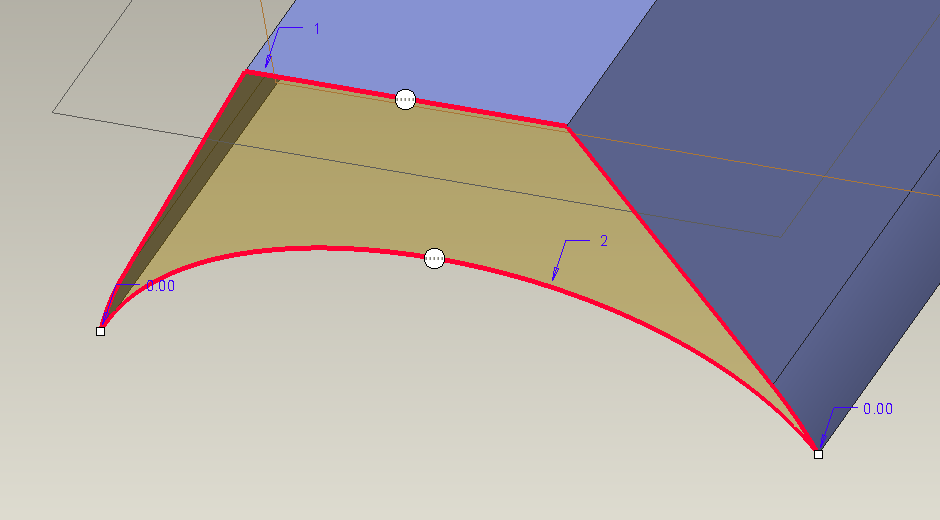
I see no problem to create this BB...

BB_test.PNG

I used standard adding non tangent boundary using <SHIFT> key.

Maybe you wish to obtain something different?

4 replies

Jan 30, 2017 8:03 PM UTC

If it's planar, you don't need a boundary blend, just do a "Fill" surface.

rsobeckiAnswer
Jan 30, 2017 8:32 PM UTC

I see no problem to create this BB...

BB_test.PNG

I used standard adding non tangent boundary using <SHIFT> key.

Maybe you wish to obtain something different?

Jan 30, 2017 8:38 PM UTC

Hi Babu,

Just select Boundary Blend command & select 2 chains in first direction

bndr_blnd.JPG

Pushkar

Jan 30, 2017 10:30 PM UTC

Like I said, if it's planar, use a "Fill" surface, it's a more simple. easy feature and takes a LOT less memory.

Simple is best.