Aug 18, 2017 10:29 AM UTC
Question

BASIC QUESTION: How to "anchor" a note/ when changing a dimension/snap line/etc. it moves "randomly"

Hi,

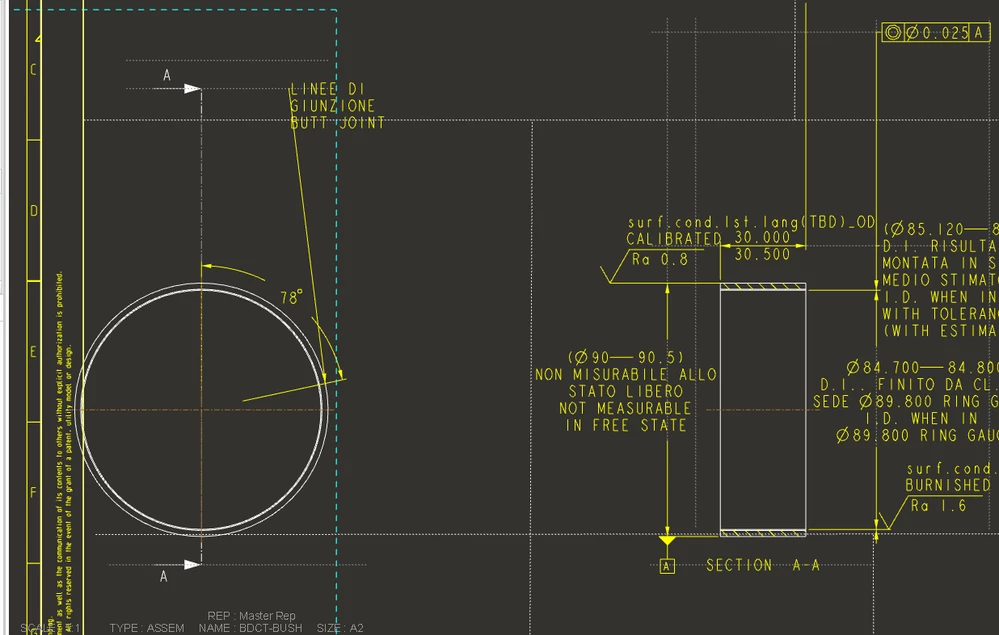
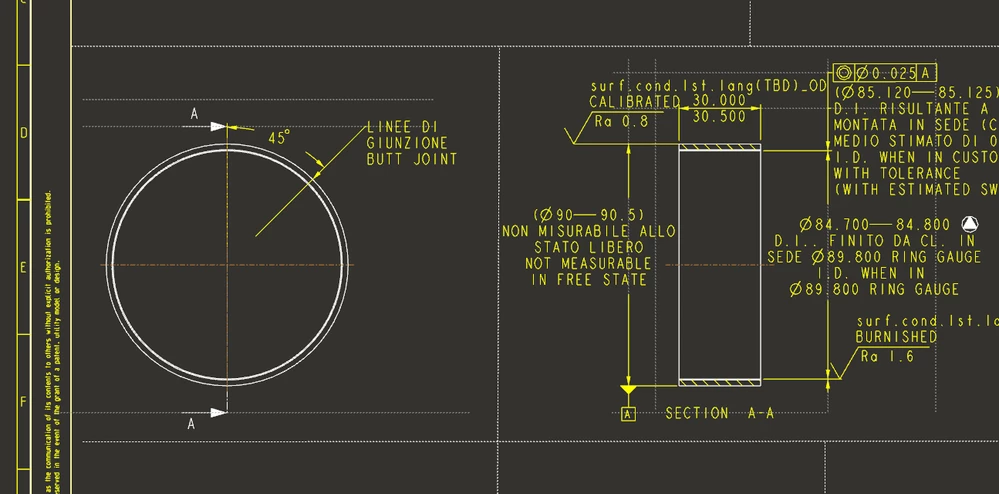
I have a small problem: the position of my note attached to an aperture of an angle it moves "randomly" when changing the value of the angle. Is there a method or a tip to keep it "fixed"?

See my example bellow: when the angle becomes 78deg instead of initially 45 deg, the notes goes way up along with the snap line attached to the view boundary without reason...

Thanks,

Nic.45 DEG.PNG78 DEG.PNG
9 replies

Aug 18, 2017 2:36 PM UTC

Try changing the size of the datum planes to match the size of the part. Otherwise they can change size automatically and this changes the extents of the part; the view defaults to part extents. The snap lines are tied to the view extents and you have dimensions placed by snap lines.


Aug 21, 2017 9:59 AM UTC

How is that angle created?


If the angle is from a datum plane, create a snap line with an "Offset Object" of 0 on that datum plane, then attach your note to that snap line.

Aug 23, 2017 9:15 AM UTC

When the angle is 105deg, all becomes like this (see the attachment). Observe the dimension line on the right view: what does that dimension (of the width) has to do with a plane??

Aug 23, 2017 9:17 AM UTC

Your note is snapped to the snapline at the top of your view (which also holds the section marker D-D)