Aug 9, 2019 2:08 PM UTC
Question

Balloon Note Orientation

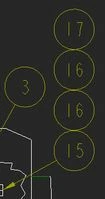
I have a string of Balloons that are attached vertically.  Is there a way I can orient them horizontally without starting over?
8-9-2019 9-04-43 AM.jpg


Thanks

5 replies

Aug 9, 2019 3:58 PM UTC

Select them and move them. They will "slide" around the diameter of the balloon they are attached to (i.e. in your picture, if you select the 16 balloon it will revolve around the 15 one).

doneillAuthor
Aug 9, 2019 4:03 PM UTC

It just moves both balloons...  


Aug 9, 2019 7:05 PM UTC

You select the balloon, "hover" over it until the movement or four-way arrow cursor shows up, then just "drag" the balloon(s) around the "parent" balloon. It also drags around any "child" balloons. See the below where I reposition the "3" balloon to the bottom of the "2" balloon. This is how things work for me in Creo 4 (and have since Creo 2 or maybe before that).BaloonMove.jpg

Aug 13, 2019 1:45 PM UTC

It depends on the type of balloon you are refering to. If it's a repeat region bom balloon (like Ken Farley is showing), you can drag the balloons around.

If it is a balloon note, I only remember being able to create these as horizontal or vertical and not being able to change them afterwards. 

doneillAuthor
Aug 13, 2019 2:01 PM UTC

Thank you... yeah... It's a Balloon Note... I was wearing it out trying to drag that balloon around!   :  )

I appreciate everyone's help!
