Aug 1, 2023 3:26 PM UTC
Solved

Arrow color - sketching

Is there a scheme to the arrow colors while sketching?

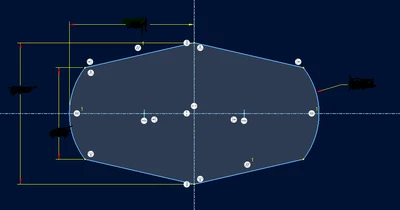
I am making a simple extrude and noticed that 6 arrows are red and 1 is yellow.

Is there any significance to this?


Thanks,

Dale

Creo 9.0.4.0
 

Dale_Rosema_0-1690903573194.png


TreblaAnswer
Aug 2, 2023 8:44 PM UTC

Hi,


This is an improvement from creo8, the color arrow means that you can drag from it, and not color arrow mean you can not drag from it.

You can see this improvement in this video https://www.youtube.com/watch?v=sxS5nlXGHEA&t=75s  minute 1:12


best whishes

4 replies

Aug 1, 2023 4:20 PM UTC

Hi,

in Creo 9.0.2.0 I can see green + black arrows when using Default Theme.

MartinHanak_0-1690906796193.png


Aug 1, 2023 4:23 PM UTC

Just noticing both sketches matched so I tested it.

Arrows to the geometry are red (green) , arrows to the reference are yellow (black)

I'm on Creo 6 and thats the case also. I don't remember noticing this before.

Aug 1, 2023 4:32 PM UTC

I hadn't either, hence the question.

TreblaAnswer
Aug 2, 2023 8:44 PM UTC

Hi,


This is an improvement from creo8, the color arrow means that you can drag from it, and not color arrow mean you can not drag from it.

You can see this improvement in this video https://www.youtube.com/watch?v=sxS5nlXGHEA&t=75s  minute 1:12


best whishes
