
Mar 22, 2017 1:56 PM UTC
Solved

Add a dimension to a table

Hello,


  I have several start parts that I use to design fixtures.  One is a simple dowel pin 6.35 mm dia.

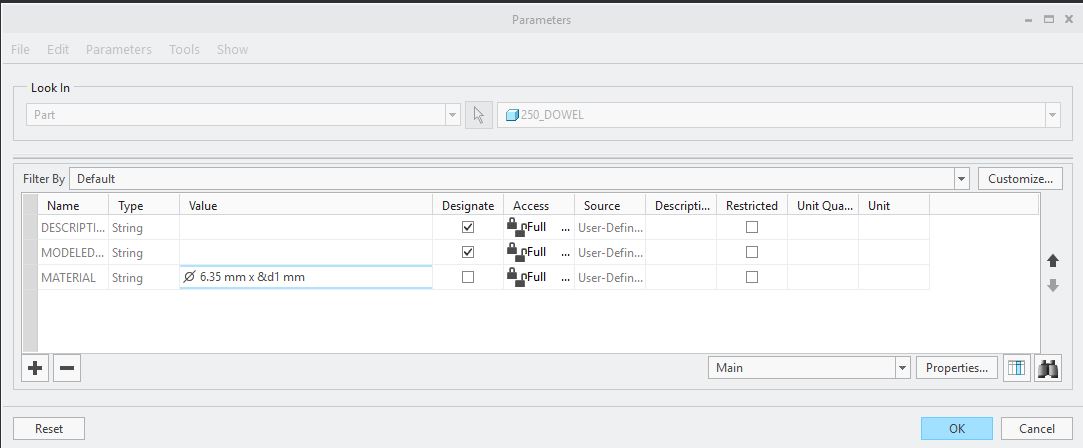
I want to create a parameter that would display in a table the diameter which will always be 6.35 mm and the length which would vary.

The capture below is what I tried but it displays in my table just as typed and does not display the d1 dimension which is my length.

Anyone have any advice on the proper syntax to use?

I am using Creo 4.0


Capture.JPG

Mar 23, 2017 6:21 AM UTC

Hi,

if length is always integer value, then you can apply following relation

MATERIAL = "ø 6.35 mm x " + itos(d1) + " mm"

MH

5 replies

Mar 22, 2017 2:25 PM UTC

d1 is a value, not a string. You will have to convert it to a string.

There have been many topics in the Community on doing this. Here are just 2:

Converting Real Numbers to Strings

How To: Format a real number relation in a note?

Mar 23, 2017 6:21 AM UTC

Hi,

if length is always integer value, then you can apply following relation

MATERIAL = "ø 6.35 mm x " + itos(d1) + " mm"

MH

bjoynerAuthor
Mar 23, 2017 12:21 PM UTC

Thanks for the help.  That worked perfect for me.

If you wouldn't mind is there a way to control the decimal places?

It is rounding my d1 value to the nearest whole number.

Mar 23, 2017 12:29 PM UTC

Hi,

see links provided by Ben Loosli.

MH