
Oct 20, 2022 10:01 AM UTC
Solved

3mf export low poly curves

When I try to export parts as 3mf or stl, curves, especially circles tend to be quite low poly. I don't know if this is because I am doing someting wrong or if this is just the way it is. I've had to resort to exporting as step and converting it in another programme. I am using CREO Student Edition 7.0.9.

Chris3Answer
Oct 20, 2022 11:30 AM UTC

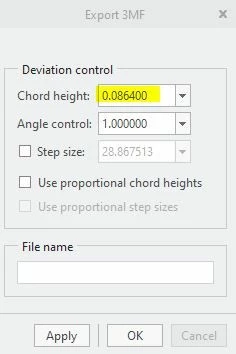
Make sure to have the customize export box checked. Then when you save, change the chord height to 0. Creo will then automatically change it to the minimum size it can produce. I also change the angle control to 1 although I don't think that has a big impact. 1 gives you more tessellation.

http://support.ptc.com/help/creo/creo_pma/usascii/index.html#page/data_exchange%2Finterface%2Fto_export_part_or_assembly_to_3MF.html 


Capture1.JPG


Capture2.JPG

3 replies

Chris3Answer
Oct 20, 2022 11:30 AM UTC

Make sure to have the customize export box checked. Then when you save, change the chord height to 0. Creo will then automatically change it to the minimum size it can produce. I also change the angle control to 1 although I don't think that has a big impact. 1 gives you more tessellation.

http://support.ptc.com/help/creo/creo_pma/usascii/index.html#page/data_exchange%2Finterface%2Fto_export_part_or_assembly_to_3MF.html 


Capture1.JPG


Capture2.JPG

Nov 10, 2023 8:13 PM UTC

Is there a way to set default values for chord height, so I don't need to enter it everytime?

Nov 13, 2023 12:25 PM UTC

Unfortunately there is no setting for this, but you can make a mapkey for it.